
- Home
- Author's Archive:

Review MIDI keyboard Nektar SE49. Where to buy it?
Nektar Technology’s MIDI controllers offer unrivaled remote control for your music software and are packed with powerful features. They bridge the gap between software and hardware with Nektar DAW control for most major DAWs and performance tools that help you create music more intuitively. I’ll tell you how this post is built. First I will list the features of this Nektar SE49 keyboard. Then you have a video or two, purchase links and useful comments from other users and then you have one of the most useful parts; comparison tables with similar keyboards so you can compare.
- With 49 keys with dynamic sensitivity
- 7 switchable speed curves — 4 User Presets, 3 Configured Presets
- Buttons for Octave Up/Down & Transpose Up/Down
- 30 mm fader
- DAW controls among others for Transport, Track and Patch selection and Level
- Compatible with any MIDI operating software under OS X, Windows & iOS
- Class Compliant True Plug and Play
- Powered by USB port
- Connection for 6.3 mm Sustain Jack pedal
- Nektar DAW integration: Windows Vista, 7, 8, 10, MAC OS X 10.7 or higher
- Nektar DAW integration for all conventional DAWs including Bitwig, Cubase, Garageband, Logic, Nuendo, Digital Performer, Mixcraft, Reason, Reaper, Sonar and Studio One
- Size: 805 x 197 x 69 mm
- Weight: 2.2 kg
- Includes Bitwig 8-Track Software (online download)

It features an integrated USB connection and sustain pedal input, and includes the Bitwig 8-Track Software license (online download).
Now that we have seen the features of this Nektar SE49 keyboard look at these related videos to learn more.
Posts you may be interested in
- Ranking with the best midi keyboards
- My selection of cheap midi keyboards.
- Best MIDI Software to work with.
- MIDI Basic Guide.
- Midi Keyboards by Brand.
Nektar SE49 vs M-Audio Keystation 49 MK3
The Nektar SE49 MIDI Keyboard is priced at €64/£58/$64 when the M-Audio Keystation 49 MK3 is priced at €88/£75/$87. Let’s go head to head:
- The Nektar SE49 provides 49 keys with dynamic sensitivity, and the M-Audio Keystation 49 MK3 provides 49 speed-sensitive keys.
- The Nektar SE49 offers buttons for Octave Up/Down & Transpose Up/Down, a 30mm fader, and pitch bend and modulation wheels. When the M-Audio Keystation 49 MK3 offers octave buttons, transport buttons for DAW control, an assignable fader, movement buttons, and pitch bend and modulation wheels.
- Both feature an integrated USB connection and a sustain pedal input.
- The Nektar SE49 includes the Bitwig 8-Track Software license (online download). And the M-Audio Keystation 49 MK3 includes the licenses for Pro Tools First M-Audio Edition, Ableton Live Lite, AIR Mini Grand, AIR Velvet, and AIR Xpand!2.
Let’s put the features of these keyboards in a table so you can compare
|
Nektar SE49 |
M-Audio Keystation 49 MK3 |
|---|---|
|
|
In our first comparison we have on the one hand the Nektar SE49 which we have already analyzed and on the other hand the M-Audio Keystation 49 MK3 which offers 49 speed-sensitive keys, octave buttons, transport buttons for DAW control, an assignable fader, movement buttons and pitch bend and modulation wheels.
We have two very similar controllers, having the same range of keys, plus very similar functions such as an assignable fader, and octave buttons, plus they have the same connections. For the price, you can go for the Nektar SE49 as it’s a bit cheaper, but if you’re interested in licensing then the M-Audio Keystation 49 MK3 is sure to be a better choice.
Here’s a video of the M-Audio Keystation 49 MK3 keyboard
If you want to know more about this option, click on the following link to see the M-Audio Keystation 49 MK3 review.
Nektar SE49 vs Alesis Q49 Keyboard Controller
The Nektar SE49 MIDI Keyboard is priced at €64/£58/$64 when the Alesis Q49 Keyboard Controller is priced at €75/£63/$72, with such a small difference of £9. Let’s move on to the face-to-face:
- The Nektar SE49 offers 49 keys with dynamic sensitivity, and the Alesis offers 49 keys with sensitivity.
- The Nektar SE49 offers buttons for Octave Up/Down & Transpose Up/Down, a 30mm fader, and pitch bend and modulation wheels. The Alesis offers pitch bend and modulation wheels, buttons for octave up/down, and a fader (sliding resistor) for program changes.
- Both integrate a USB connection and a sustain pedal input.
- The Nektar SE49 includes the Bitwig 8-Track Software license (online download). And the Alesis includes the Ableton Live Lite and Alesis Edition licenses.
Let’s put the features of these keyboards in a table so you can compare
|
Nektar SE49 |
Alesis Q49 Keyboard Controller |
|---|---|
|
|
In this comparison, we have on the one hand the Nektar SE49 which we have already analyzed above, and on the other hand, the Alesis Q49 Keyboard Controller which offers 49 keys with sensitivity, pitch bend and modulation wheels, buttons for octave up/down, and a fader (sliding resistance) for program changes.
Again we have two very similar controllers, and we also have the Nektar SE49 being slightly cheaper, and as an advantage of the Alesis Q49 we can count on its licenses, very valued by most beginners. Both are good drivers.
And here is a video of the Alesis Q49 Keyboard Controller
If you want to know more about this option, click on the following link to see the Alesis Q49 Keyboard Controller review.
Nektar SE49 vs Akai LPK 25
The Nektar SE49 MIDI Keyboard is priced at €64/£58/$64 while the Akai LPK 25 is priced at €42/£37/$42. Let’s see the face-to-face:
- The Nektar SE49 provides 49 keys with dynamic sensitivity, and the Akai LPK 25 provides 25 mini-sensitive keys.
- The Nektar SE49 offers buttons for Octave Up/Down & Transpose Up/Down, a 30mm fader, and pitch bend and modulation wheels. The Akai offers octave up/down buttons, arpeggiator buttons, tap tempo and sustain.
- The Nektar SE 49 has an integrated USB connection and a sustain pedal input. The Akai only has a USB connection
- The Nektar SE49 includes the Bitwig 8-Track Software license (online download). And the Akai includes a software editor for Mac and PC.
Let’s put the features of these keyboards in a table so you can compare
|
Nektar SE49 |
Akai LPK 25 |
|---|---|
|
|
In this comparison, we have in one corner the Nektar SE49 with its functions and features that we have analyzed above, and in the other corner we have the Akai LPK 25 which offers 25 mini-format speed-sensitive keys, octave up/down buttons, arpeggiator buttons, tap tempo and sustain.
The advantage of the Nektar SE49 would be its 49 keys and its 30mm fader. Now the Akai LPK 25 although it is a very minimalist MIDI controller has great compatibility with different DAWs and so also has great portability. The Nektar SE49 is a better controller, although the Akai LPK 25 can become a very useful controller in certain cases.
And here is a video of the Akai LPK 25 keyboard
If you want to know more about this option, click on the following link to see the Akai LPK 25 review.
Nektar SE49 vs Miditech Midistart Music 25
The Nektar SE49 MIDI Keyboard is priced at €64/£58/$64 when the Miditech Midistart Music 25 is priced at €58/£51/$60, with a small difference that this may vary depending on where we ask. Let’s go head to head:
- The Nektar SE49 provides 49 keys with dynamic sensitivity, and the Miditech Midistart Music 25 provides 25 keys with sensitivity.
- The Nektar SE49 offers buttons for Octave Up/Down & Transpose Up/Down, a 30mm fader, and pitch bend and modulation wheels. The Miditech Midistart Music 25 features octave up/down buttons, a joystick for pitch bend and modulation, and an assignable fader.
- Both feature an integrated USB connection and a sustain pedal input.
- The Nektar SE49 includes the Bitwig 8-Track Software license (online download). And the Miditech Midistart Music 25 includes the Magix Samplitude SE.
Let’s put the features of these keyboards in a table so you can compare
|
Nektar SE49 |
Miditech Midistart Music 25 |
|---|---|
|
|
In this comparison, we have on the one hand the Nektar SE49, which we have already analyzed, and on the other hand, the Miditech Midistart Music 25 which offers 25 large keys with sensitivity, octave up/down buttons, and a joystick for pitch bend and modulation, and an assignable fader.
As an advantage of the Nektar 49 we can mention its 49 keys, and as an advantage of the Miditech Midistart Music 25 it is somewhat more compact, in case you have limited space it could serve you better. Go for the Nektar 49 as for almost the same price you get a wider range of keyboards.
And here’s a video of the Miditech Midistart Music 25 keyboard
If you want to know more about this option, click on the following link to see the Miditech Midistart Music 25 review.
Nektar SE49 vs M-Audio Oxygen 61 Mk4
The Nektar SE49 MIDI Keyboard is priced at €64/£58/$64 when the M-Audio Oxygen 61 Mk4 is priced at €155/£133/$154. Let’s go head to head:
- The Nektar SE49 provides 49 keys with dynamic sensitivity, and the M-Audio Oxygen 61 Mk4 provides 61 full-size, velocity-sensitive synthesizer action keys.
- The Nektar SE49 offers buttons for Octave Up/Down & Transpose Up/Down, a 30mm fader, and pitch bend and modulation wheels. The M-Audio Oxygen 61 Mk4 offers 8 speed-sensitive trigger pads, 8 assignable knobs, 9 assignable faders, octave buttons, other function buttons, and pitch bend and modulation wheels.
- Both feature an integrated USB connection and a sustain pedal input.
- The Nektar SE49 includes the Bitwig 8-Track Software license (online download). And the M-Audio Oxygen 61 MK4 includes SONiVOX Twist (Software), Ableton Live Lite (Software).
Let’s put the features of these keyboards in a table so you can compare
|
Nektar SE49 |
M-Audio Oxygen 61 Mk4 |
|---|---|
|
|
In our latest comparison, we have the Nektar SE49 with the features and functions we’ve already discussed, and on the other hand, we have the M-Audio Oxygen 61 Mk4 which offers 61 full-size velocity-sensitive synth-action keys, 8 velocity-sensitive trigger pads, 8 assignable knobs, 9 assignable faders, octave buttons, other function buttons and pitch bend and modulation wheels.
As an advantage of the Nektar SE49 we can say that it is a good controller that is a little more compact due to the 4-octave range it has, however, the M-Audio Oxygen 61 MK4 is a better controller due to the control functions it has and thus also an extra octave in its key range. Although the price is also higher, the difference is justified according to the functions offered.
Here is a video of the M-Audio Oxygen 61 Mk4 keyboard
If you want to know more about this option, click on the following link to see the M-Audio Oxygen 61 Mk4 review.
What is the best of these MIDI keyboards if I am a beginner on a budget?
While the answer to this question lies mostly in what specific need you have, for example, if you want to have a keyboard with the widest possible note range, or if you want to have as many control features as possible, or perhaps a mix between the two, that is without leaving behind the different connections and software licenses offered by most MIDI controllers, we will give an objective opinion according to our experience in music production and thus also with the price demanded by the controllers, a kind of value for money.
In this post, we have a group of MIDI controllers that do not exceed 155 ? so they are economic controllers with moderate control functions, we can comment as the most ideal for a beginner in music production to the M-Audio Oxygen 61 MK4, which offers 61 keys of full size and with speed sensitivity (intensity in MIDI language), we also have pads, knobs and faders as other control functions, it also integrates a sustain pedal input and also includes licenses that are very valued for beginners. If you have the opportunity, don’t hesitate to buy it.
Where to buy the Nektar SE49 keyboard
Thomann
- Free Shipping.
- Full warranty. If you have any problems, they take care of everything.
- 100% reliable payment.
- A leader in trouble-free shipping.
- Usually the Best price.
- Best Reputation: They are the leading online store in Europe and have the best catalog and information.
Amazon
- Free Shipping and the possibility of shipping in one day with Amazon Premium.
- Full Guarantee but they are no experts in music equipment.
- Sometimes a better price.
- He’s got worse stock than Thomann.
Also, look at these models with a similar price and features:
- Novation Launchkey Mini MK3
- Akai MPK mini Mk2
- Akai MPK miniplay
- Roli Lightpad Block M Studio Ed.
- Arturia MiniLab MKII
- Roli Beatmaker Kit
- Novation Impulse 25
- Akai MPK mini MK2 white
- Alesis V25
- CME Xkey Air 25
- IK Multimedia iRig Keys I/O 25
- Akai APC Keys 25
- Akai LPK 25
- M-Audio Code 25 black
- Native Instruments Komplete Kontrol A25
- Novation Launchkey Mini MK2
- Alesis V mini
- Arturia MicroLab Black
- Akai LPK 25 wireless
- Akai MPK mini Limited Black
- Arturia MiniLab MKII Inverted Edition
- M-Audio Oxygen 25 Mk4
- Korg nanoKEY Studio
- Swissonic EasyKey 25
- Korg nanoKEY 2 black
- Korg nanoKEY 2 Limited Orange
- Korg nanoKEY 2 Limited Blue
- Akai MPK mini MK2 white – AIEP3 Bdl
- Nektar Impact LX25+
- Novation Launchkey 25 MK2
- Alesis Q25
- Akai MPK 225
- Korg microKEY 25
- Miditech Midistart Music 25
- Alesis VI25
- Korg nanoKEY 2 white
- Arturia MicroLab Blue
- Nektar SE25
- Korg microKEY Air 25
- IK Multimedia iRig Keys 25
- Midiplus X2 mini
- Icon iKeyboard 3X
- Keith McMillen K-Board
- CME Xkey 25 silver
- Native Instruments Komplete Kontrol M32
- Alesis V49
- Arturia Keystep Black Edition
- Swissonic EasyKey 49
- Arturia Keystep
- Arturia KeyLab Essential 49
- Nektar Impact LX49+
- M-Audio Code 49 Black
- IK Multimedia iRig Keys 2 Pro
- M-Audio Keystation 49 MK3
- M-Audio Keystation Mini 32 MK3
- Novation Impulse 49
- Nektar Impact GX 49
- Novation Launchkey 49 Mk2
- Native Instruments Komplete Kontrol A49
- M-Audio Oxygen 49 Mk4
- Alesis Q49 Keyboard Controller
- Roland A-300 Pro
- IK Multimedia iRig Keys I/O 49
- Alesis VI49
- Midiplus AK490
- Alesis Vortex Wireless 2
- M-Audio Axiom Air Mini 32
- Alesis Vortex Wireless 2 Network
- IK Multimedia iRig Keys 37 Pro
- Arturia KeyLab Essential 49 BE
- Haken Audio Continuum Half Size
- CME Xkey 37 LE
- IK Multimedia iRig Keys Pro
- Korg microKEY 49 MkII
- IK Multimedia iRig Keys 2
- Miditech Midistart Music 49
- Roland A-49 Black
- Korg microKEY 37 MkII
- Swissonic ControlKey 49
- Roland A-500 PRO
- Nektar SE49
- Korg microKEY Air 37
- Korg microKEY Air 49
- Roland A-49 White
- Nektar Panorama T4
- Miditech Garagekey mini
- Miditech Minicontrol-32
- Midiplus X3 mini
- Miditech i2-Control 37 Black
- Icon iKeyboard 4X
- Miditech i2-mini 32
- Midiplus X4 mini
- Miditech i2-mini 32 Bluetooth
- Icon iKeyboard 5X
- Acorn Masterkey 49
- M-Audio Code 61 Black
- Arturia KeyLab Essential 61
- Nektar Impact GX 61
- M-Audio Keystation 61 MK3
- Alesis V61
- Native Instruments Komplete Kontrol A61
- Swissonic EasyKey 61
- M-Audio Oxygen 61 Mk4
- Roland A-800 Pro
- Korg microKEY Air 61
- GSi DMC-122
- Nektar Impact LX61+
- Alesis VI61
- Novation Launchkey 61 MK2
- Icon iKeyboard 6X
- Acorn Masterkey 61
- Miditech i2-61 Black Edition
- Midiplus X6 mini
- Korg microKEY 61 MkII
- Midiplus X-6 II
- Viscount Physis Piano K5 EX
- M-Audio Keystation 88 MkII
- Kawai VPC1
- Doepfer LMK2+ 88 GH
- Doepfer LMK4+ 88 GH black
- Swissonic ControlKey 88
- Viscount Physis Piano K4 EX
- Doepfer LMK4+ 88 GH grey
- Nektar Impact LX88+
- Haken Audio Continuum Full Size
- Midiplus Stage 88
- Studiologic Numa Concert
- Icon iKeyboard 8X
- Doepfer LMK2+ 88 GH without Case
- Midiplus X-8 II
- Doepfer LMK4+ 88 GH GR without Case

Review MIDI keyboard Roland A-500 PRO. Where to buy it?
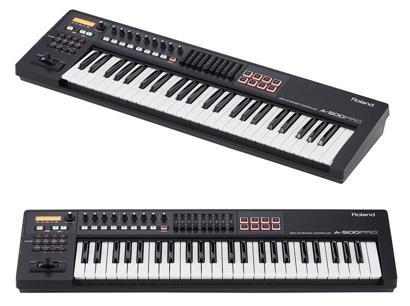
I’ll tell you how this post is built. First I list the features of the Roland A-500 PRO keyboard. Then you have a video or two, purchase links and useful comments from other users and then you have one of the most useful parts; comparison tables with similar keyboards so you can compare.
- 49 Velocity sensitive keys with channel aftertouch
- 8 Illuminated, velocity painful and sensitive pads with hold function
- 9 Rotary encoders, 9 faders and 13 buttons, all of which are programmable
- Transport control section
- Active Controller Technology (ACT)
- Connectors in the part panel for space-saving installation
- Powered by USB is possible – no power supply is necessary
- Windows 7- and Mac OS X Snow Leopard compatible
- Rubber coated pitch bend (Functionality that changes the sound wave of what you play and then returns to its original state)/modulation stick
- Connectors for optional sustain- and phrase pedal (The most important pedal of a piano or keyboard is the sustain pedal and is used to keep the note playing even if you stop pressing the key.)s, MIDI in/out with low latency FPT transmission
- Dimensions: 839 x 251 x 91 mm
- Weight: 3.8 kg
- Incl. Software
This keyboard usually has a price around 253.00 €
Now that we’ve seen the features of this keyboard Roland A-500 PRO watch these related videos to learn more.
Post you may be interested in
- Ranking with the best midi keyboards
- My selection of cheap midi keyboards.
- Best MIDI Software to work with.
- MIDI Basic Guide.
- Midi Keyboards by Brand.
Some comments from people who come to the forum about this model:
Comment:
This keyboard has lots of features, it might be nearly perfect if…. the pads were not because bad since they are, this really is difficult to drum regularly. Additionally, the application which will be utilized to reprogram the presets and choose communications being midi does not work properly. I have actually contacted Roland support and tried different combinations, Windows 7 and Windows 8.1, however the i that is best’ve ever got is always to plan only one fader. The sending of sysex data seems to go ok ( the scheduled system provides no errors) nonetheless it just reprograms one slider. Now I am looking a keyboard that would not be tied to any DAW and might be reprogrammed more reliably (and perhaps not reliant on one program).
Roland A-500 PRO vs Novation Impulse 61
The keyboard Roland A-500 PROis usually 80 € cheaper than Novation Impulse 61.
And then a video of the keyboard
|
Roland A-500 PRO |
Novation Impulse 61 |
|---|---|
|
|
And then a video of the keyboardNovation Impulse 61
If you want to know more about this option, click on the following link to see the Novation Impulse 61 review
Roland A-500 PRO vs Novation Impulse 49
The keyboard Roland A-500 PRO is usually 31 € more expensive than Novation Impulse 49, but the difference is so small that this can vary..
And then a video of the keyboard
|
Roland A-500 PRO |
Novation Impulse 49 |
|---|---|
|
|
And then a video of the keyboardNovation Impulse 49
If you want to know more about this option, click on the following link to see the Novation Impulse 49 review
Roland A-500 PRO vs Novation Launchkey 49 Mk2
The keyboard Roland A-500 PRO is usually 58 € more expensive than Novation Launchkey 49 Mk2.
And then a video of the keyboard
|
Roland A-500 PRO |
Novation Launchkey 49 Mk2 |
|---|---|
|
|
And then a video of the keyboardNovation Launchkey 49 Mk2
If you want to know more about this option, click on the following link to see the Novation Launchkey 49 Mk2 review
Roland A-500 PRO vs Nektar Impact LX88+
The keyboard Roland A-500 PRO is usually 4 € more expensive than Nektar Impact LX88+, but the difference is so small that this can vary..
And then a video of the keyboard
|
Roland A-500 PRO |
Nektar Impact LX88+ |
|---|---|
|
|
And then a video of the keyboardNektar Impact LX88+
If you want to know more about this option, click on the following link to see the Nektar Impact LX88+ review
Where to buy the keyboard Roland A-500 PRO
Thomann
- Free Shipping.
- Full warranty. If you have any problems, they take care of everything.
- 100% reliable payment.
- Leader in trouble-free shipping.
- Usually Best price.
- Best Reputation: They are the leading online store in Europe and have the best catalogue and information.
Amazon
- Free Shipping and possibility of shipping in one day with Amazon Premium.
- Full Guarantee but they are no experts in music equipment.
- Sometimes better price.
- He’s got worse stock than Thomann.
Also look at these models with a similar price and features:
- Novation Launchkey Mini MK3
- Akai MPK mini Mk2
- Akai MPK miniplay
- Roli Lightpad Block M Studio Ed.
- Arturia MiniLab MKII
- Roli Beatmaker Kit
- Novation Impulse 25
- Akai MPK mini MK2 white
- Alesis V25
- CME Xkey Air 25
- IK Multimedia iRig Keys I/O 25
- Akai APC Keys 25
- Akai LPK 25
- M-Audio Code 25 black
- Native Instruments Komplete Kontrol A25
- Novation Launchkey Mini MK2
- Alesis V mini
- Arturia MicroLab Black
- Akai LPK 25 wireless
- Akai MPK mini Limited Black
- Arturia MiniLab MKII Inverted Edition
- M-Audio Oxygen 25 Mk4
- Korg nanoKEY Studio
- Swissonic EasyKey 25
- Korg nanoKEY 2 black
- Korg nanoKEY 2 Limited Orange
- Korg nanoKEY 2 Limited Blue
- Akai MPK mini MK2 white – AIEP3 Bdl
- Nektar Impact LX25+
- Novation Launchkey 25 MK2
- Alesis Q25
- Akai MPK 225
- Korg microKEY 25
- Miditech Midistart Music 25
- Alesis VI25
- Korg nanoKEY 2 white
- Arturia MicroLab Blue
- Nektar SE25
- Korg microKEY Air 25
- IK Multimedia iRig Keys 25
- Midiplus X2 mini
- Icon iKeyboard 3X
- Keith McMillen K-Board
- CME Xkey 25 silver
- Native Instruments Komplete Kontrol M32
- Alesis V49
- Arturia Keystep Black Edition
- Swissonic EasyKey 49
- Arturia Keystep
- Arturia KeyLab Essential 49
- Nektar Impact LX49+
- M-Audio Code 49 Black
- IK Multimedia iRig Keys 2 Pro
- M-Audio Keystation 49 MK3
- M-Audio Keystation Mini 32 MK3
- Novation Impulse 49
- Nektar Impact GX 49
- Novation Launchkey 49 Mk2
- Native Instruments Komplete Kontrol A49
- M-Audio Oxygen 49 Mk4
- Alesis Q49 Keyboard Controller
- Roland A-300 Pro
- IK Multimedia iRig Keys I/O 49
- Alesis VI49
- Midiplus AK490
- Alesis Vortex Wireless 2
- M-Audio Axiom Air Mini 32
- Alesis Vortex Wireless 2 Red
- IK Multimedia iRig Keys 37 Pro
- Arturia KeyLab Essential 49 BE
- Haken Audio Continuum Half Size
- CME Xkey 37 LE
- IK Multimedia iRig Keys Pro
- Korg microKEY 49 MkII
- IK Multimedia iRig Keys 2
- Miditech Midistart Music 49
- Roland A-49 Black
- Korg microKEY 37 MkII
- Swissonic ControlKey 49
- Roland A-500 PRO
- Nektar SE49
- Korg microKEY Air 37
- Korg microKEY Air 49
- Roland A-49 White
- Nektar Panorama T4
- Miditech Garagekey mini
- Miditech Minicontrol-32
- Midiplus X3 mini
- Miditech i2-Control 37 Black
- Icon iKeyboard 4X
- Miditech i2-mini 32
- Midiplus X4 mini
- Miditech i2-mini 32 Bluetooth
- Icon iKeyboard 5X
- Acorn Masterkey 49
- M-Audio Code 61 Black
- Arturia KeyLab Essential 61
- Nektar Impact GX 61
- M-Audio Keystation 61 MK3
- Alesis V61
- Native Instruments Komplete Kontrol A61
- Swissonic EasyKey 61
- M-Audio Oxygen 61 Mk4
- Roland A-800 Pro
- Korg microKEY Air 61
- GSi DMC-122
- Nektar Impact LX61+
- Alesis VI61
- Novation Launchkey 61 MK2
- Icon iKeyboard 6X
- Acorn Masterkey 61
- Miditech i2-61 Black Edition
- Midiplus X6 mini
- Korg microKEY 61 MkII
- Midiplus X-6 II
- Viscount Physis Piano K5 EX
- M-Audio Keystation 88 MkII
- Kawai VPC1
- Doepfer LMK2+ 88 GH
- Doepfer LMK4+ 88 GH black
- Swissonic ControlKey 88
- Viscount Physis Piano K4 EX
- Doepfer LMK4+ 88 GH grey
- Nektar Impact LX88+
- Haken Audio Continuum Full Size
- Midiplus Stage 88
- Studiologic Numa Concert
- Icon iKeyboard 8X
- Doepfer LMK2+ 88 GH without Case
- Midiplus X-8 II
- Doepfer LMK4+ 88 GH GR without Case
Review MIDI keyboard Swissonic ControlKey 49. Where to buy it?
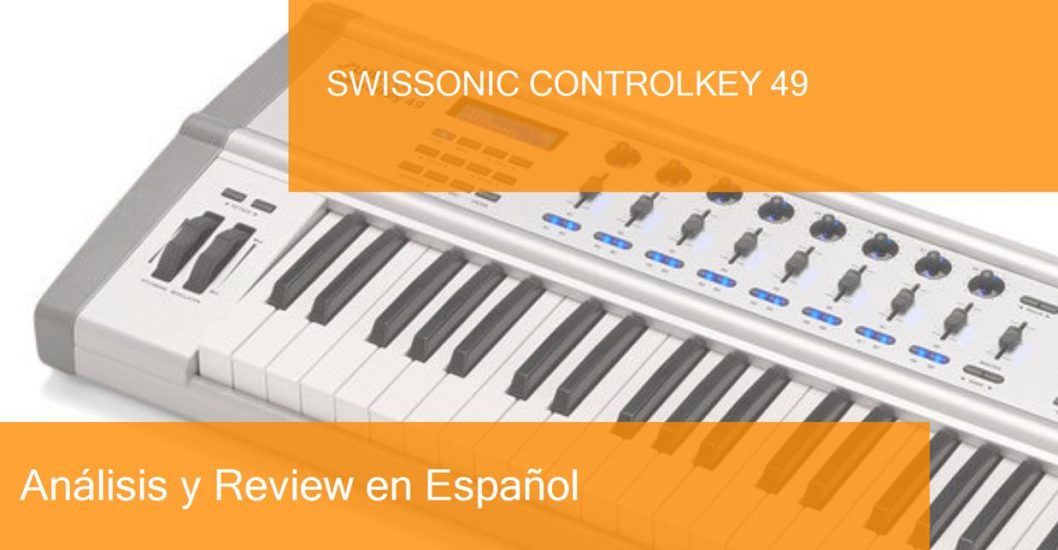
I’ll tell you how this post is built. First I list the features of the Swissonic ControlKey 49 keyboard. Then you have a video or two, purchase links and useful comments from other users and then you have one of the most useful parts; comparison tables with similar keyboards so you can compare.
- 49 Semi-weighted velocity sensitive keys with aftertouch
- Pitchbend- and modulation wheel
- 8 Velocity delicate trigger pads
- 9 Faders
- 8 Rotary encoders
- 9 Mute and solamente buttons
- Backlit LCD show
- Transport controls: Rewind, fast ahead, stop, play, record
- Octave / Transpose buttons
- Menu Buttons: Menu, scene, bank, track, patch, channel, page, value, enter, exit
- Assignable functions for the trigger pads: Bank, velocity bend, 8 levels, full level, hold, roll, aftertouch and mode
- 30 Scene storage space locations
- 1x 6.3 mm Jack input for sustain- or expression pedal (The most important pedal of a piano or keyboard is the sustain pedal and is used to keep the note playing even if you stop pressing the key.)
- 5-Pin midi (MIDI allows you to do such wonderful things as connect the keyboard to the computer, record a soundtrack and with certain programs pass with a click what you have played to musical notes in a score. MIDI tracks store information from musical notes) output
- USB connector for MIDI connection to a computer
- USB driven or optional power supply: 9V 500 mA
- USB cable included in delivery
- PC and Mac compatible
- Dimensions (W x D x H): 825 x 320 x 87 mm
- Incl. Thomann Studio Starter Kit LE (Software packet with DAW pc software, pc software synthesizers along with impacts plugins)

Now that we’ve seen the features of this keyboard Swissonic ControlKey 49 watch these related videos to learn more.
Post you may be interested in
- Ranking with the best midi keyboards
- My selection of cheap midi keyboards.
- Best MIDI Software to work with.
- MIDI Basic Guide.
- Midi Keyboards by Brand.
Some comments from people who come to the forum about this model:
Comment:
I originate from a household of very prominent and well known Swedish composers and doing musicians. To me the looks, reliability, functionality and quality of a musical instrument is most significant.
The Swissonic ControlKey 49 far surpassed all original expectations that I ever endured at first.
I have always been happy and most impressed by Swissonic ControlKey 49 timeless sleek look, sturdiness, quality of workmanship, the wide variety functions while the uncomplicated integration into my DAW programs. It makes it a pleasure that’s true fantasy up brand new compositions also to recognize it with this particular tool.
most useful of most, it comes at an excellent affordable cost for a Midi Controller Keyboard, that inside it?s course can very easily rank with the more expensive big manufacturer instruments available available on the market.
I have not found any such thing to grumble about that MIDI Controller Keyboard and I confidently and wholeheartedly suggest the Swissonic ControlKey 49 to virtually any aspiring or professional musician.
I thank the sort folks at Mh Thomann for their professional service, knowledgeable advice, fast order handling and super fast delivery.
Comment:
The velocity isn’t great. When wanting to play lightly sometimes key does not even output midi/note.
Swissonic ControlKey 49 vs Akai MPK mini Mk2
The keyboard Swissonic ControlKey 49 is usually 61 € more expensive than Akai MPK mini Mk2.
And then a video of the keyboard
|
Swissonic ControlKey 49 |
Akai MPK mini Mk2 |
|---|---|
|
|
And then a video of the keyboardAkai MPK mini Mk2
If you want to know more about this option, click on the following link to see the Akai MPK mini Mk2 review
Swissonic ControlKey 49 vs Swissonic EasyKey 49
The keyboard Swissonic ControlKey 49 is usually 80 € more expensive than Swissonic EasyKey 49.
And then a video of the keyboard
|
Swissonic ControlKey 49 |
Swissonic EasyKey 49 |
|---|---|
|
|
And then a video of the keyboardSwissonic EasyKey 49
If you want to know more about this option, click on the following link to see the Swissonic EasyKey 49 review
Swissonic ControlKey 49 vs Arturia Keystep
The keyboard Swissonic ControlKey 49 is usually 38 € more expensive than Arturia Keystep, but the difference is so small that this can vary..
And then a video of the keyboard
|
Swissonic ControlKey 49 |
Arturia Keystep |
|---|---|
|
|
And then a video of the keyboardArturia Keystep
If you want to know more about this option, click on the following link to see the Arturia Keystep review
Swissonic ControlKey 49 vs M-Audio Keystation 88 MkII
The keyboard Swissonic ControlKey 49is usually 0 € cheaper than M-Audio Keystation 88 MkII, but the difference is so small that this can vary..
And then a video of the keyboard
|
Swissonic ControlKey 49 |
M-Audio Keystation 88 MkII |
|---|---|
|
|
And then a video of the keyboardM-Audio Keystation 88 MkII
If you want to know more about this option, click on the following link to see the M-Audio Keystation 88 MkII review
Where to buy the keyboard Swissonic ControlKey 49
Thomann
- Free Shipping.
- Full warranty. If you have any problems, they take care of everything.
- 100% reliable payment.
- Leader in trouble-free shipping.
- Usually Best price.
- Best Reputation: They are the leading online store in Europe and have the best catalogue and information.
Amazon
- Free Shipping and possibility of shipping in one day with Amazon Premium.
- Full Guarantee but they are no experts in music equipment.
- Sometimes better price.
- He’s got worse stock than Thomann.
Also look at these models with a similar price and features:
- Novation Launchkey Mini MK3
- Akai MPK mini Mk2
- Akai MPK miniplay
- Roli Lightpad Block M Studio Ed.
- Arturia MiniLab MKII
- Roli Beatmaker Kit
- Novation Impulse 25
- Akai MPK mini MK2 white
- Alesis V25
- CME Xkey Air 25
- IK Multimedia iRig Keys I/O 25
- Akai APC Keys 25
- Akai LPK 25
- M-Audio Code 25 black
- Native Instruments Komplete Kontrol A25
- Novation Launchkey Mini MK2
- Alesis V mini
- Arturia MicroLab Black
- Akai LPK 25 wireless
- Akai MPK mini Limited Black
- Arturia MiniLab MKII Inverted Edition
- M-Audio Oxygen 25 Mk4
- Korg nanoKEY Studio
- Swissonic EasyKey 25
- Korg nanoKEY 2 black
- Korg nanoKEY 2 Limited Orange
- Korg nanoKEY 2 Limited Blue
- Akai MPK mini MK2 white – AIEP3 Bdl
- Nektar Impact LX25+
- Novation Launchkey 25 MK2
- Alesis Q25
- Akai MPK 225
- Korg microKEY 25
- Miditech Midistart Music 25
- Alesis VI25
- Korg nanoKEY 2 white
- Arturia MicroLab Blue
- Nektar SE25
- Korg microKEY Air 25
- IK Multimedia iRig Keys 25
- Midiplus X2 mini
- Icon iKeyboard 3X
- Keith McMillen K-Board
- CME Xkey 25 silver
- Native Instruments Komplete Kontrol M32
- Alesis V49
- Arturia Keystep Black Edition
- Swissonic EasyKey 49
- Arturia Keystep
- Arturia KeyLab Essential 49
- Nektar Impact LX49+
- M-Audio Code 49 Black
- IK Multimedia iRig Keys 2 Pro
- M-Audio Keystation 49 MK3
- M-Audio Keystation Mini 32 MK3
- Novation Impulse 49
- Nektar Impact GX 49
- Novation Launchkey 49 Mk2
- Native Instruments Komplete Kontrol A49
- M-Audio Oxygen 49 Mk4
- Alesis Q49 Keyboard Controller
- Roland A-300 Pro
- IK Multimedia iRig Keys I/O 49
- Alesis VI49
- Midiplus AK490
- Alesis Vortex Wireless 2
- M-Audio Axiom Air Mini 32
- Alesis Vortex Wireless 2 Red
- IK Multimedia iRig Keys 37 Pro
- Arturia KeyLab Essential 49 BE
- Haken Audio Continuum Half Size
- CME Xkey 37 LE
- IK Multimedia iRig Keys Pro
- Korg microKEY 49 MkII
- IK Multimedia iRig Keys 2
- Miditech Midistart Music 49
- Roland A-49 Black
- Korg microKEY 37 MkII
- Swissonic ControlKey 49
- Roland A-500 PRO
- Nektar SE49
- Korg microKEY Air 37
- Korg microKEY Air 49
- Roland A-49 White
- Nektar Panorama T4
- Miditech Garagekey mini
- Miditech Minicontrol-32
- Midiplus X3 mini
- Miditech i2-Control 37 Black
- Icon iKeyboard 4X
- Miditech i2-mini 32
- Midiplus X4 mini
- Miditech i2-mini 32 Bluetooth
- Icon iKeyboard 5X
- Acorn Masterkey 49
- M-Audio Code 61 Black
- Arturia KeyLab Essential 61
- Nektar Impact GX 61
- M-Audio Keystation 61 MK3
- Alesis V61
- Native Instruments Komplete Kontrol A61
- Swissonic EasyKey 61
- M-Audio Oxygen 61 Mk4
- Roland A-800 Pro
- Korg microKEY Air 61
- GSi DMC-122
- Nektar Impact LX61+
- Alesis VI61
- Novation Launchkey 61 MK2
- Icon iKeyboard 6X
- Acorn Masterkey 61
- Miditech i2-61 Black Edition
- Midiplus X6 mini
- Korg microKEY 61 MkII
- Midiplus X-6 II
- Viscount Physis Piano K5 EX
- M-Audio Keystation 88 MkII
- Kawai VPC1
- Doepfer LMK2+ 88 GH
- Doepfer LMK4+ 88 GH black
- Swissonic ControlKey 88
- Viscount Physis Piano K4 EX
- Doepfer LMK4+ 88 GH grey
- Nektar Impact LX88+
- Haken Audio Continuum Full Size
- Midiplus Stage 88
- Studiologic Numa Concert
- Icon iKeyboard 8X
- Doepfer LMK2+ 88 GH without Case
- Midiplus X-8 II
- Doepfer LMK4+ 88 GH GR without Case