

Review MIDI keyboard Nektar Impact LX61+. Where to buy it?
Nektar Technology’s MIDI controllers offer unrivaled remote control for your music software and are packed with powerful features. They bridge the gap between software and hardware with Nektar DAW control for most major DAWs and performance tools that help you create music more intuitively. I’ll tell you how this post is built. First I list the features of this Nektar Impact LX61+ keyboard. Then you have a video or two, purchase links and useful comments from other users and then you have one of the most useful parts; comparison tables with similar keyboards so you can compare.
- With 61 speed-sensitive keys
- DAW integration including track volume and track selection, patch selection and more
- Suitable for all popular DAWs, including Logic, Cubase, Studio One, Reason, Bitwig and more
- 9 faders of 30mm
- 8 rotary encoders
- 9 assignable buttons
- 6 transport buttons
- Octave shift
- Transposition switches
- Pitch bend and modulation wheels
- 4-speed curves plus 3 fixed speeds
- 8 speed-sensitive pads with 4-color LED illumination providing 4 pad assignments and ‘learn’ pad function
- Clip and scene switches for clip-based DAWs
- Extended transport controls, including click, go to locator and more
- 5 memory locations for user-defined parameter settings
- Native USB support for real Plug ‘n Play
- USB bus-powered
- Connectors: Input for TS Footswitch jack 1/4″, USB
- WIN 7 or higher, MAC OSX 10.7 or higher
- Includes Bitwig 8-Track software download
- Dimensions: 965 x 267 x 76mm approx.
- Weight: 4,1kg
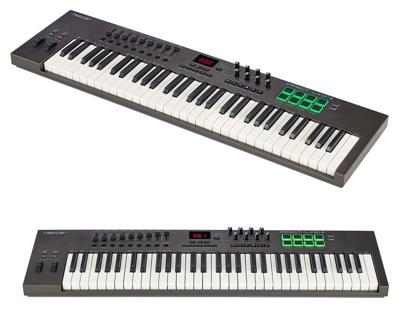
It also offers the following control functions: 9 assignable 30mm faders, 8 assignable knobs, 9 assignable buttons, 6 transport buttons, octave shift buttons (up/down), and pitch bend and modulation wheels. In addition to switches and scene clips for DAWs.
On connections, the Nektar Impact LX61+ has a built-in sustain pedal input, USB connection where it is also powered. It also includes a Bitwig 8-Track software download.
Now that we’ve seen the features of this Nektar Impact LX61+ keyboard look at these related videos to find out more.
Posts you may be interested in
- Ranking with the best midi keyboards
- My selection of cheap midi keyboards.
- Best MIDI Software to work with.
- MIDI Basic Guide.
- Midi Keyboards by Brand.
Nektar Impact LX61+ vs Nektar Panorama P6
The Nektar Impact LX61+ MIDI Keyboard is priced at €148/£133/$148 while the Nektar Panorama P6 is priced at €444 with a difference of £296 between them. Let’s go head to head:
- Both controllers have 61 speed-sensitive keys. In the case of the Nektar Panorama P6 they have Aftertouch.
- The Nektar Impact LX61+ offers 9 assignable 30mm faders, 8 assignable knobs, 9 assignable buttons, 6 transport buttons, octave shift buttons (up/down), and pitch bend and modulation wheels. In addition to switches and scene clips for DAWs. And the Nektar Panorama P6 offers 16 assignable knobs, 9 assignable 45mm faders, 1 100mm ALPS Motorfader (mechanical fader), 10 configurable LED switches, 28 freely configurable switches, 12 speed and pulse sensitive pads, and pitch bend and modulation wheels.
- The Nektar Impact LX61+ has an integrated sustain pedal input and USB connection. The Nektar Panorama P6 integrates a MIDI output, a USB connection, and two pedal inputs (expression and sustain).
Let’s put the features of these keyboards in a table so you can compare
|
Nektar Impact LX61+ |
Nektar Panorama P6 |
|---|---|
|
|
In our first comparison, we find two Nektar brand MIDI controllers, on the one hand, the Nektar Impact LX61+ which offers 61 speed-sensitive keys, 9 assignable 30mm faders, 8 assignable knobs, 9 assignable buttons, 6 transport buttons, octave shift buttons (up/down), and pitch bend and modulation wheels. And on the other hand, the Nektar Panorama P6 offers 61 sensitive counterbalanced keys and Aftertouch, 16 assignable knobs, 9 assignable 45mm faders, 1 100mm ALPS Motorfader (mechanical fader), 10 configurable LED switches, 28 freely configurable switches, 12 speed and pulse sensitive pads, and pitch bend and modulation wheels.
While both are good MIDI controllers, having a lot of control functions, the Nektar Panorama P6 has better performance, also raising its price almost 4 times. This price increase is not as justified if we put it face to face with a somewhat smaller model, such as the Nektar Impact LX61+, which for its price is an excellent choice. If you want a mechanical fader that offers the Nektar Panorama P6 and you have the budget you can go for it, otherwise, the Nektar Impact LX61+ is an excellent option for the price it has.
And here’s a video of the Nektar Panorama P6 keyboard
If you want to know more about this option, click on the following link to see the Nektar Panorama P6 review.
Nektar Impact LX61+ vs Novation Launchkey 25 MK3
The Nektar Impact LX61+ MIDI Keyboard is priced at €148/£133/$148 and the Novation Launchkey 25 MK3 is priced at €165/£149/$168, with a small difference of £17:
- The Nektar Impact LX61+ has 61 speed-sensitive keys, while the Novation Launchkey 25 MK3 has 25 speed-sensitive keys.
- The Nektar Impact LX61+ offers 9 assignable 30mm faders, 8 assignable knobs, 9 assignable buttons, 6 transport buttons, octave shift buttons (up/down), and pitch bend and modulation wheels. In addition to switches and scene clips for DAWs. And the Novation Launchkey 25 MK3 features 16 RGB-backlit speed-sensitive pads, 8 assignable knobs, transport buttons (rec, play, pause), octave up/down buttons, and other functions. Plus pitch bend and modulation wheels.
- The Nektar Impact LX61+ has an integrated sustain pedal input and a USB connection. The Novation Launchkey 25 MK3 integrates a MIDI output, a USB connection, and a sustain pedal input.
- The Nektar Impact LX61+ includes a Bitwig eight-Track license, while the Novation Launchkey 25 MK3 includes licenses for Ableton Live Lite, Serato Sample LE, AAS Session Bundle, XLN Addictive Keys (1 of 4 selectable virtual keyboards), Klevgrand R0Verb-, DAW Cassette, Spitfire Audio LABS-Expressive Strings.
Let’s put the features of these keyboards in a table so you can compare
|
Nektar Impact LX61+ |
Novation Launchkey 25 MK3 |
|---|---|
|
|
In this comparison, we again find two quality MIDI controllers, on the one hand, the already analyzed Nektar Impact LX61+, and on the other hand, we have the Novation Launchkey 25 MK3 which offers 25 velocity-sensitive keys, 16 RGB backlit velocity-sensitive pads, 8 assignable knobs, transport buttons (rec, play, pause), octave up/down buttons and other functions. Plus pitch bend and modulation wheels.
While both are good, the Nektar Impact LX61+ has certain advantages over the competition, starting with the greater number of keys, and thus also a greater and better number of control functions. The advantage that can save the Novation Launchkey 25 MK3, is its MIDI output and the licenses it offers, which for beginners come in handy.
Here is a video of the Novation Launchkey 25 MK3
If you want to know more about this option, click on the following link to see the Novation Launchkey 25 MK3 review.
Nektar Impact LX61+ vs Novation Impulse 25
The Nektar Impact LX61+ MIDI Keyboard is priced at €148/£133/$148 and the Novation Impulse 25 is priced at €165/£149/$168, just as the above comparison is £17. Let’s go head to head:
- The Nektar Impact LX61+ has 61 speed-sensitive keys, while the Novation Impulse 25 offers 25 semi-heavy and speed-sensitive keys, plus it has an Aftertouch function.
- The Nektar Impact LX61+ offers 9 assignable 30mm faders, 8 assignable knobs, 9 assignable buttons, 6 transport buttons, octave shift buttons (up/down), and pitch bend and modulation wheels. In addition to switches and scene clips for DAWs. And the Novation Impulse 25 offers 8 RGB backlit speed-sensitive pads, 8 assignable knobs, 1 55mm fader, transport buttons (rec, play, pause), octave up/down buttons and other functions. Plus pitch bend and modulation wheels.
- The Nektar Impact LX61+ has an integrated sustain pedal input and a USB connection. The Novation Impulse 25 integrates a MIDI input and output, a USB connection, and input for sustain and expression pedals.
- The Nektar Impact LX61+ includes a Bitwig eight-Track license, while the Novation Impulse 25 includes the Xcite+ Software Pack, Ableton Live Lite licenses.
Let’s put the features of these keyboards in a table so you can compare
|
Nektar Impact LX61+ |
Novation Impulse 25 |
|---|---|
|
|
We have a very similar comparison to the previous one, on the one hand, the Nektar Impact LX61+ that we have already analyzed before, and on the other hand, we have the Novation Impulse 25 that offers 25 semi-heavy keys and with Aftertouch, 8 speed-sensitive pads backlit with RGB, 8 assignable knobs, 1 55mm fader, transport buttons (rec, play, pause), octave up/down buttons and other functions. Plus pitch bend and modulation wheels.
The Nektar Impact LX61+ has certain advantages over the competition, starting with the greater number of keys, and thus also a greater and better number of control functions. The advantage that can save the Novation Impulse 25, is its MIDI input and output and the licenses it offers and the semi-weight of its keys.
Here is a video of the Novation Impulse 25 keyboard
If you want to know more about this option, click on the following link to see the Novation Impulse 25 review.
Nektar Impact LX61+ vs Native Instruments Komplete Kontrol A25
The Nektar Impact LX61+ MIDI Keyboard is priced at €148/£133/$148 and the Native Instruments Komplete Kontrol A25 is priced at €135/£125/$137, but the difference is so small that this may vary from shop to shop. Let’s go head to head:
- The Nektar Impact LX61+ has 61 speed-sensitive keys, while the Native Instruments Komplete Kontrol A25 offers 25 medium-heavy and speed-sensitive keys.
- The Nektar Impact LX61+ offers 9 assignable 30mm faders, 8 assignable knobs, 9 assignable buttons, 6 transport buttons, octave shift buttons (up/down), and pitch bend and modulation wheels. In addition to switches and scene clips for DAWs. And the Native Instruments Komplete Kontrol A25 offers 1 4D push encoder, 8 assignable knobs, transport buttons (rec, play, pause), octave up/down buttons and other functions. In addition to pitch bend and modulation wheels.
- Both integrate a sustain pedal input and a USB connection.
- The Nektar Impact LX61+ includes a Bitwig eight-Track license, while the Native Instruments Komplete Kontrol A25 includes licenses for The Gentleman, Monark, Scarbee Mark I, Reaktor Prism, Reaktor Blocks Wired, Reaktor 6 Player, Kontakt 6 Player, Guitar Rig 5 Player, Komplete Kontrol Software, Maschine Essential.
Let’s put the features of these keyboards in a table so you can compare
|
Nektar Impact LX61+ |
Native Instruments Komplete Kontrol A25 |
|---|---|
|
|
This comparison is very similar to the two previous ones, on the one hand, we have the Nektar Impact LX61+ with its functions and features that we have already analyzed before, and on the other hand, we have the Native Instruments Komplete Kontrol A25 that offers 25 semi-weighted keys with sensitivity, 1 4D push encoder, 8 assignable knobs, transport buttons (rec, play, pause), up/down octave buttons and other functions. In addition to pitch bend and modulation wheels.
As before, the Nektar has certain advantages over its competitors, however, in the Native Instruments Komplete Kontrol A25 we find semi-balanced keys that improve the quality of the keystroke. The best option will be the Nektar Impact LX61+.
And here’s a video of the Native Instruments Komplete Kontrol A25
If you want to know more about this option, click on the following link to see the Native Instruments Komplete Kontrol A25 review.
Nektar Impact LX61+ vs Arturia KeyLab 88 MkII
The Nektar Impact LX61+ MIDI Keyboard is priced at €148/£133/$148 and the Arturia KeyLab 88 MkII is priced at €875/£789/$866. Let’s go head to head:
- The Nektar Impact LX61+ has 61 speed-sensitive keys, when the Arturia KeyLab 88 MkII offers a Fatar plywood keyboard, with hammer action (Fatar — TP100LR) of 88 keys, with sensitivity and Aftertouch.
- The Nektar Impact LX61+ offers 9 assignable 30mm faders, 8 assignable knobs, 9 assignable buttons, 6 transport buttons, octave shift buttons (up/down), and pitch bend and modulation wheels. In addition to switches and scene clips for DAWs. And the Arturia KeyLab 88 MKII offers 16 illuminated pads with chord memory function, 9 assignable faders, 9 assignable knobs, transport buttons (rec, play, pause, stop, etc.), a center knob for choosing different functions, modulation and pitch bend wheels.
- The Nektar Impact LX61+ has an integrated sustain pedal input and a USB connection. The Arturia KeyLab 88 MkII integrates CV outputs (pitch out, gate out, Mod 1 and Mod 2), MIDI input and output, inputs for expression, sustain and 3 auxiliary pedals, CV input, external power supply input and USB connection.
- The Nektar Impact LX61+ includes a Bitwig eight-Track license, while the Arturia includes the Analog Lab 4 software licenses with 6000 synthesizer sounds, Ableton Live Lite, Arturia Wurli V, Arturia VOX Continental V and Arturia Piano V.
Let’s put the features of these keyboards in a table so you can compare
|
Nektar Impact LX61+ |
Arturia KeyLab 88 MkII |
|---|---|
|
|
In our last comparison we have a somewhat unfair face, on the one hand, the Nektar Impact LX61+ with the functions and features that we have already commented and analyzed previously, and on the other hand the Arturia KeyLab 88 MkII that offers a Fatar plywood keyboard, with hammer action (Fatar — TP100LR) of 88 keys, with sensitivity and Aftertouch, 16 illuminated pads with chord memory function, 9 assignable faders, 9 assignable knobs, transport buttons (rec, play, pause, stop, etc), a central knob to choose different functions, modulation wheels and pitch bend. And all its connections.
As we can notice logically the Arturia KeyLab 88 MkII will be the best option by far, and it also increases the price of it. If you have the budget for a high-end MIDI controller with excellent functions and features, go for it. If you have a smaller budget or just don’t want to spend a lot, the Nektar Impact LX61+ will be an excellent choice.
And here’s a video of the Arturia KeyLab 88 MkII
If you want to know more about this option, click on the following link to see the Arturia KeyLab 88 MKII review.
Which is the best of these MIDI keyboards if I am a beginner on a low budget?
While the answer to this question lies mostly in what specific need you have, for example, if you want to have a keyboard with the widest possible note range, or if you want to have as many control functions as possible, or perhaps a mix between the two, that is without leaving behind the different connections and software licenses that most MIDI controllers offer, we will give an objective opinion according to our experience in music production and thus also with the price that the controllers demand, a kind of value for money.
In this post, the Nektar Impact LX61+ takes the prize as a very balanced MIDI controller for a beginner, as it provides a 61-key keyboard and assignable fader, encoder, and button control functions that are very useful in a DAW of the user’s preference, it also offers transport buttons, a sustain pedal input, and an audio editor license. An excellent choice for the beginning of music production.
Where to buy the Nektar Impact LX61+ keyboard
Thomann
- Free Shipping.
- Full warranty. If you have any problems, they take care of everything.
- 100% reliable payment.
- A leader in trouble-free shipping.
- Usually the Best price.
- Best Reputation: They are the leading online store in Europe and have the best catalog and information.
Amazon
- Free Shipping and the possibility of shipping in one day with Amazon Premium.
- Full Guarantee but they are no experts in music equipment.
- Sometimes a better price.
- He’s got worse stock than Thomann.
Also, look at these models with a similar price and features:
- Novation Launchkey Mini MK3
- Akai MPK mini Mk2
- Akai MPK miniplay
- Roli Lightpad Block M Studio Ed.
- Arturia MiniLab MKII
- Roli Beatmaker Kit
- Novation Impulse 25
- Akai MPK mini MK2 white
- Alesis V25
- CME Xkey Air 25
- IK Multimedia iRig Keys I/O 25
- Akai APC Keys 25
- Akai LPK 25
- M-Audio Code 25 black
- Native Instruments Komplete Kontrol A25
- Novation Launchkey Mini MK2
- Alesis V mini
- Arturia MicroLab Black
- Akai LPK 25 wireless
- Akai MPK mini Limited Black
- Arturia MiniLab MKII Inverted Edition
- M-Audio Oxygen 25 Mk4
- Korg nanoKEY Studio
- Swissonic EasyKey 25
- Korg nanoKEY 2 black
- Korg nanoKEY 2 Limited Orange
- Korg nanoKEY 2 Limited Blue
- Akai MPK mini MK2 white – AIEP3 Bdl
- Nektar Impact LX25+
- Novation Launchkey 25 MK2
- Alesis Q25
- Akai MPK 225
- Korg microKEY 25
- Miditech Midistart Music 25
- Alesis VI25
- Korg nanoKEY 2 white
- Arturia MicroLab Blue
- Nektar SE25
- Korg microKEY Air 25
- IK Multimedia iRig Keys 25
- Midiplus X2 mini
- Icon iKeyboard 3X
- Keith McMillen K-Board
- CME Xkey 25 silver
- Native Instruments Komplete Kontrol M32
- Alesis V49
- Arturia Keystep Black Edition
- Swissonic EasyKey 49
- Arturia Keystep
- Arturia KeyLab Essential 49
- Nektar Impact LX49+
- M-Audio Code 49 Black
- IK Multimedia iRig Keys 2 Pro
- M-Audio Keystation 49 MK3
- M-Audio Keystation Mini 32 MK3
- Novation Impulse 49
- Nektar Impact GX 49
- Novation Launchkey 49 Mk2
- Native Instruments Komplete Kontrol A49
- M-Audio Oxygen 49 Mk4
- Alesis Q49 Keyboard Controller
- Roland A-300 Pro
- IK Multimedia iRig Keys I/O 49
- Alesis VI49
- Midiplus AK490
- Alesis Vortex Wireless 2
- M-Audio Axiom Air Mini 32
- Alesis Vortex Wireless 2 Network
- IK Multimedia iRig Keys 37 Pro
- Arturia KeyLab Essential 49 BE
- Haken Audio Continuum Half Size
- CME Xkey 37 LE
- IK Multimedia iRig Keys Pro
- Korg microKEY 49 MkII
- IK Multimedia iRig Keys 2
- Miditech Midistart Music 49
- Roland A-49 Black
- Korg microKEY 37 MkII
- Swissonic ControlKey 49
- Roland A-500 PRO
- Nektar SE49
- Korg microKEY Air 37
- Korg microKEY Air 49
- Roland A-49 White
- Nektar Panorama T4
- Miditech Garagekey mini
- Miditech Minicontrol-32
- Midiplus X3 mini
- Miditech i2-Control 37 Black
- Icon iKeyboard 4X
- Miditech i2-mini 32
- Midiplus X4 mini
- Miditech i2-mini 32 Bluetooth
- Icon iKeyboard 5X
- Acorn Masterkey 49
- M-Audio Code 61 Black
- Arturia KeyLab Essential 61
- Nektar Impact GX 61
- M-Audio Keystation 61 MK3
- Alesis V61
- Native Instruments Komplete Kontrol A61
- Swissonic EasyKey 61
- M-Audio Oxygen 61 Mk4
- Roland A-800 Pro
- Korg microKEY Air 61
- GSi DMC-122
- Nektar Impact LX61+
- Alesis VI61
- Novation Launchkey 61 MK2
- Icon iKeyboard 6X
- Acorn Masterkey 61
- Miditech i2-61 Black Edition
- Midiplus X6 mini
- Korg microKEY 61 MkII
- Midiplus X-6 II
- Viscount Physis Piano K5 EX
- M-Audio Keystation 88 MkII
- Kawai VPC1
- Doepfer LMK2+ 88 GH
- Doepfer LMK4+ 88 GH black
- Swissonic ControlKey 88
- Viscount Physis Piano K4 EX
- Doepfer LMK4+ 88 GH grey
- Nektar Impact LX88+
- Haken Audio Continuum Full Size
- Midiplus Stage 88
- Studiologic Numa Concert
- Icon iKeyboard 8X
- Doepfer LMK2+ 88 GH without Case
- Midiplus X-8 II
- Doepfer LMK4+ 88 GH GR without Case

