
- Home
- Author's Archive:

Review MIDI keyboard Alesis VI25. Where to buy it?
Alesis is a company founded in the United States in 1980 that designs and markets electronic musical instruments, digital audio processors, audio mixers, drum amplifiers, digital audio interface amplifiers, recording equipment, drum machines, professional audio and electronic percussion products. I’ll tell you how this post is built. First I list the features of this Alesis VI25 keyboard. Then you have a video or two, purchase links and useful comments from other users and then you have one of the most useful parts; comparison tables with similar keyboards so you can compare.
- 25 semi-built keys with full-size aftertouch with square front
- 16 speed-sensitive trigger pads with RGB backlighting for rhythm production and clip release
- Interface with 24 buttons and 8 knobs that can be assigned to your music software
- Pitch and modulation wheels provide precise and creative control
- Seamless visual information via LED display and illuminated buttons + knobs
- USB MIDI port and 5-pin MIDI output offer flexible MIDI connectivity
- USB powered
- Plug-and-Play support for Mac and PC
- Includes USB cable, Ableton Live Lite software (download), Xpand! 2 software (download)

It also features 16 speed-sensitive trigger pads with RGB backlighting for rhythm production and clip release, an interface with 24 assignable buttons and 8 assignable knobs with your music software, and pitch bend and modulation wheels that provide precise and creative control.
When connected, it is powered via USB, so no other external power source is needed. A 5-pin MIDI output is also integrated. And it’s Plug and Play for Mac and PC.
Finally we can mention that it includes Ableton Live Lite software (download), Xpand software! 2 software from Air Music Tech (download).
Now that we have seen the features of this Alesis VI25 keyboard watch these related videos to know more.
Posts you may be interested in
- Ranking with the best midi keyboards
- My selection of cheap midi keyboards.
- Best MIDI Software to work with.
- MIDI Basic Guide.
- Midi Keyboards by Brand.
Alesis VI25 vs Alesis V25
The Alesis VI25 MIDI Keyboard is priced at €139/£122/$138 and the Alesis V25 is priced at €75/£66/$73. Let’s move on to the face-to-face:
- Both offer us 25 keys with sensitivity, but in the Alesis VI25, they are semi-heavy, having better quality and feel when playing the keyboard.
- Both offer speed-sensitive backlit pads (intensity in MIDI language), in the Alesis V25 they are 8, and in the Alesis VI25 they are 16.
- We also have assignable knobs and buttons, in the case of the Alesis V25 there are 4 knobs and 4 buttons, and in the Alesis VI25 there are 24 buttons and 8 knobs.
- Both offer pitch bend and modulation wheels that allow you to change the height of a note while playing.
- Both share visual information through the illuminated knobs and buttons, when the Alesis Vl49 also has an LED display.
- Both can be powered via USB (USB port) and the Alesis VI25 has a 5-pin MIDI output offering flexible MIDI connectivity.
- Both include the Ableton Live Lite software license (download), Xpand! software, and the Alesis VI25 software 2 software (download).
Let’s put the features of these keyboards in a table so you can compare
|
Alesis VI25 |
Alesis V25 |
|---|---|
|
|
In our first comparison, we found two MIDI controllers that are very similar, due to the fact that they are of the same brand and one is an improvement of the other. On the one hand, we have the Alesis V25 that offers 25 keys with sensitivity, 8 speed-sensitive backlit pads, 4 assignable knobs and 4 assignable buttons, octave up and down buttons and pitch and modulation wheels. On the other hand, the Alesis VI25 improves or increases its same features, therefore we can say that it is a better controller and that its increase in price is worth paying.
And here is a video of the Alesis V25 keyboard
If you want to know more about this option, click on the following link to see the Alesis V25 review.
Alesis VI25 vs M-Audio Code 25 black
The Alesis VI25 MIDI Keyboard is priced at €139/£122/$138 and the M-Audio Code 25 black is priced at €160. Let’s go head to head:
- Both controllers offer 25 full-size keys with sensitivity and aftertouch, those of the Alesis are semi-weighted.
- The Alesis VI25 offers 16 speed-sensitive trigger pads, an interface with 24 assignable buttons and 8 assignable knobs, and pitch bend and modulation wheels. The M-Audio Code 25 Black also offers 1 assignable XY control pad, 16 fully assignable speed-sensitive trigger pads, 4 assignable knobs, 5 assignable faders, 5 assignable buttons, and pitch bend and modulation wheels.
- Both are USB powered, and also accept external power supply input and accept sustain pedal. The Alesis VI25 has MIDI output.
- The Alesis VI25 is licensed under Ableton Live Lite, Hybrid thirty and Loom by Air Music Technology. The M-Audio Code 25 Black includes Ableton Live Lite, Hybrid thirty and Loom by Air Music Technology software.
Let’s put the features of these keyboards in a table so you can compare
|
Alesis VI25 |
M-Audio Code 25 black |
|---|---|
|
|
As in the previous comparison, we find two similar MIDI controllers, on the one hand the Alesis VI25 with its functions that we have already analyzed, and on the other hand the M-Audio Code 25 that offers 25 sensitive and aftertouch keys, 1 assignable XY control pad, 16 fully assignable speed-sensitive trigger pads, 4 assignable knobs, 5 assignable faders, 5 assignable buttons and pitch bend/modulation wheels.
Both controllers have almost the same control functions, as an advantage of the Alesis we can have more buttons assignable to different functions in the DAW to be used, and in the M-Audio we can count as an advantage the XY control which is a pad that allows real-time control of parameters or functions in two dimensions, and is useful to improvise with it. If you’re more inclined to use the assignable buttons and semi-weighted keys, go for the Alesis, and if you want XY control pad, the M-Audio will be your choice.
Here’s a video of the M-Audio Code 25 black keyboard
https://www.youtube.com/watch?v=LVkw0fZYGWQ&t=48s
If you want to know more about this option, click on the following link to see the M-Audio Code 25 black review.
Alesis VI25 vs Akai MPK mini MK2 white
The Alesis VI25 MIDI Keyboard is priced at €139/£122/$138 and the Akai MPK mini MK2 white is priced at €79/£70/$81. This is the face-to-face one:
- Both controllers offer 25 full-size keys with sensitivity and aftertouch, the Alesis’ are semi-weighted.
- The Alesis VI25 offers 16 speed-sensitive trigger pads, an interface with 24 assignable buttons and 8 assignable knobs, and pitch bend and modulation wheels. And the Akai MPK mini MK2 white offers 1 4-way thumbstick for dynamic pitch/modulation control, 8 MPC (MIDI Production Center) pads with note repeat, Arpeggiator buttons, octaves up/down, and 8 assignable control knobs.
- Both are USB powered, and also accept external power supply input and accept sustain pedal. The Alesis VI25 has a MIDI output.
- The Alesis VI25 includes the Ableton Live Lite, Hybrid thirty and Loom by Air Music Technology licenses. The Akai MPK mini MK2 white is licensed under Hybrid 3 by AIR Music Tech, SONiVOX Wobble and Akai Pro MPC Essentials.
Let’s put the features of these keyboards in a table so you can compare
|
Alesis VI25 |
Akai MPK mini MK2 white |
|---|---|
|
|
Again we have another comparison with similar MIDI controllers, on the one hand, the Alesis VI25 with its familiar features and functions, on the other hand, the Akai MPK Mini MK2 which offers 25 mini synthesizer action keys, 1 4-way thumbstick for dynamic pitch/modulation control, 8 MPC (MIDI Production Center) pads with note repetition, Arpeggiator buttons, octaves up/down, and 8 assignable control knobs.
The Alesis VI 25 will be a better choice if you want to have a MIDI keyboard with normal and semi-weighted keys without removing certain controller functions. However, if you want a smaller rig the Akai MPK Mini MK2 will be a good choice and a bit cheaper too.
And here is a video of the Akai MPK mini MK2 white
If you want to know more about this option, click on the following link to see the Akai MPK mini MK2 white review.
Alesis VI25 vs Novation Launchkey 25 MK2
The Alesis VI25 MIDI Keyboard is priced at €139/£122/$138 and the Novation Launchkey 25 MK2 is priced at €165/£149/$168, with a difference of £26 between the two. Let’s go head to head:
- Both controllers offer 25 full-size keys with sensitivity, the Alesis’ are semi-weighted and have aftertouch.
- The Alesis VI25 offers 16 speed-sensitive trigger pads, an interface with 24 assignable buttons and 8 assignable knobs, and pitch bend and modulation wheels. And the Novation Launchkey 25 MK2 offers 16 sensitive and backlit pads, 8 assignable knobs, transport buttons (rec, play, pause, etc) and modulation and pitch bend wheels.
- Both are USB powered, and also accept external power supply input, both accept sustain pedal and have MIDI output.
- The Alesis VI25 includes the Ableton Live Lite, Hybrid thirty and Loom by Air Music Technology licenses. The Novation Launchkey 25 MK2 is licensed under Ableton Live Lite, Serato Sample LE, AAS Session Bundle, XLN Addictive Keys (1 of 4 selectable virtual keyboards), Klevgrand R0Verb-, DAW Cassette and Spitfire Audio LABS-Expressive Strings.
Let’s put the features of these keyboards in a table so you can compare
|
Alesis VI25 |
Novation Launchkey 25 MK2 |
|---|---|
|
|
In this comparison we have a similar case to the previous ones, on one hand, we find the Alesis VI25 and on the other hand, we find the Novation Launchkey 25 MK2 that offers 25 sensitive keys, 16 sensitive and backlit pads, 8 assignable knobs, transport buttons (rec, play, pause, etc) and modulation and pitch bend wheels.
In the advantages of the first one, the Alesis VI25, we find a better keyboard due to the semi-controlled and aftertouch, and its faders that will be very useful in functions like mixing, and provides greater precision. In the advantages of the Novation Launchkey 25 MK3 we find a large number of licenses it offers, which for beginners are of great value. The Alesis VI25 would be the best choice.
And here’s a video of the Novation Launchkey 25 MK2
https://www.youtube.com/watch?v=Ln5Zf7dr5WQ
If you want to know more about this option, click on the following link to see the Novation Launchkey 25 MK2 review.
Alesis VI25 vs Novation Impulse 25
The Alesis VI25 MIDI Keyboard is priced at €139/£122/$138 while the Novation Impulse 25 is priced at €165/£149/$168, with a difference of 26 euros. The face-to-face:
- Both controllers offer 25 full-size keys with sensitivity, semi-weighted and aftertouch function.
- The Alesis VI25 offers 16 speed-sensitive trigger pads, an interface with 24 assignable buttons and 8 assignable knobs, and pitch bend and modulation wheels. And the Novation Impulse 25 offers 8 backlit Drum Pads, 1 55mm Fader, 8 assignable knobs, modulation and pitch bend wheels and up/down octave keys. It offers the option of auto-mapping, where each button or function assigns itself a parameter or function.
- Both are USB powered, and also accept external power supply input, both accept sustain pedal and have MIDI output. The Novation Impulse 25 also has a MIDI input.
- The Alesis VI25 is licensed under Ableton Live Lite, Hybrid thirty and Loom by Air Music Technology. The Novation Impulse 25 is licensed under the Xcite+ Software Pack, Ableton Live Lite.
Let’s put the features of these keyboards in a table so you can compare
|
Alesis VI25 |
Novation Impulse 25 |
|---|---|
|
|
Again we have another comparison with similar MIDI controllers, on the one hand the Alesis VI25 with its features and functions we already know, on the other hand the Novation Impulse 25 which offers 25 full size keys, semi-balanced and with aftertouch, 8 backlit Drum-Pads, 1 55mm Fader, 8 assignable knobs, modulation and pitch bend wheels and up/down octave keys. It also offers the option of automation, where each button or function is self-assigned a parameter or function.
As mentioned above, these are two very similar MIDI controllers, both offering a keyboard with the same features and the other control functions are also very similar. The difference lies in the number of elements, for example in the Alesis we have 16 pads, while in the Novation 8. The Alesis VI25 has a slight advantage because of the latter, so it will be the best choice.
And here is a video of the Novation Impulse 25 keyboard
If you want to know more about this option, click on the following link to see the Novation Impulse 25 review.
Which is the best of these MIDI keyboards if I am a beginner on a low budget?
While the answer to this question lies mostly in what specific need you have, for example, if you want to have a keyboard with the widest range of notes possible, or if you want to have as many control functions as possible, or perhaps a mix between the two, that is without leaving behind the different connections and software licenses that most MIDI controllers offer, we will give an objective opinion according to our experience in music production and thus also with the price demanded by the controllers, a kind of value for money.
And in this post, we find cheap MIDI controllers up to a maximum of 165 euros, and as a star product, we have the Alesis VI25 that offers a semi-balanced keyboard with 25 keys and great control functions like: pads, buttons and knobs, and a relevant amount of each one unlike other controllers, all of them assignable. It integrates the USB connection, sustains pedal input, and also MIDI output. A great controller for a fair price. If you have the opportunity to buy it, go for it.
Where to buy the Alesis VI25 keyboard
Thomann
- Free Shipping.
- Full warranty. If you have any problems, they take care of everything.
- 100% reliable payment.
- A leader in trouble-free shipping.
- Usually the Best price.
- Best Reputation: They are the leading online store in Europe and have the best catalog and information.
Amazon
- Free Shipping and the possibility of shipping in one day with Amazon Premium.
- Full Guarantee but they are no experts in music equipment.
- Sometimes a better price.
- He’s got worse stock than Thomann.
Also, look at these models with a similar price and features:
- Novation Launchkey Mini MK3
- Akai MPK mini Mk2
- Akai MPK miniplay
- Roli Lightpad Block M Studio Ed.
- Arturia MiniLab MKII
- Roli Beatmaker Kit
- Novation Impulse 25
- Akai MPK mini MK2 white
- Alesis V25
- CME Xkey Air 25
- IK Multimedia iRig Keys I/O 25
- Akai APC Keys 25
- Akai LPK 25
- M-Audio Code 25 black
- Native Instruments Komplete Kontrol A25
- Novation Launchkey Mini MK2
- Alesis V mini
- Arturia MicroLab Black
- Akai LPK 25 wireless
- Akai MPK mini Limited Black
- Arturia MiniLab MKII Inverted Edition
- M-Audio Oxygen 25 Mk4
- Korg nanoKEY Studio
- Swissonic EasyKey 25
- Korg nanoKEY 2 black
- Korg nanoKEY 2 Limited Orange
- Korg nanoKEY 2 Limited Blue
- Akai MPK mini MK2 white – AIEP3 Bdl
- Nektar Impact LX25+
- Novation Launchkey 25 MK2
- Alesis Q25
- Akai MPK 225
- Korg microKEY 25
- Miditech Midistart Music 25
- Alesis VI25
- Korg nanoKEY 2 white
- Arturia MicroLab Blue
- Nektar SE25
- Korg microKEY Air 25
- IK Multimedia iRig Keys 25
- Midiplus X2 mini
- Icon iKeyboard 3X
- Keith McMillen K-Board
- CME Xkey 25 silver
- Native Instruments Komplete Kontrol M32
- Alesis V49
- Arturia Keystep Black Edition
- Swissonic EasyKey 49
- Arturia Keystep
- Arturia KeyLab Essential 49
- Nektar Impact LX49+
- M-Audio Code 49 Black
- IK Multimedia iRig Keys 2 Pro
- M-Audio Keystation 49 MK3
- M-Audio Keystation Mini 32 MK3
- Novation Impulse 49
- Nektar Impact GX 49
- Novation Launchkey 49 Mk2
- Native Instruments Komplete Kontrol A49
- M-Audio Oxygen 49 Mk4
- Alesis Q49 Keyboard Controller
- Roland A-300 Pro
- IK Multimedia iRig Keys I/O 49
- Alesis VI49
- Midiplus AK490
- Alesis Vortex Wireless 2
- M-Audio Axiom Air Mini 32
- Alesis Vortex Wireless 2 Network
- IK Multimedia iRig Keys 37 Pro
- Arturia KeyLab Essential 49 BE
- Haken Audio Continuum Half Size
- CME Xkey 37 LE
- IK Multimedia iRig Keys Pro
- Korg microKEY 49 MkII
- IK Multimedia iRig Keys 2
- Miditech Midistart Music 49
- Roland A-49 Black
- Korg microKEY 37 MkII
- Swissonic ControlKey 49
- Roland A-500 PRO
- Nektar SE49
- Korg microKEY Air 37
- Korg microKEY Air 49
- Roland A-49 White
- Nektar Panorama T4
- Miditech Garagekey mini
- Miditech Minicontrol-32
- Midiplus X3 mini
- Miditech i2-Control 37 Black
- Icon iKeyboard 4X
- Miditech i2-mini 32
- Midiplus X4 mini
- Miditech i2-mini 32 Bluetooth
- Icon iKeyboard 5X
- Acorn Masterkey 49
- M-Audio Code 61 Black
- Arturia KeyLab Essential 61
- Nektar Impact GX 61
- M-Audio Keystation 61 MK3
- Alesis V61
- Native Instruments Komplete Kontrol A61
- Swissonic EasyKey 61
- M-Audio Oxygen 61 Mk4
- Roland A-800 Pro
- Korg microKEY Air 61
- GSi DMC-122
- Nektar Impact LX61+
- Alesis VI61
- Novation Launchkey 61 MK2
- Icon iKeyboard 6X
- Acorn Masterkey 61
- Miditech i2-61 Black Edition
- Midiplus X6 mini
- Korg microKEY 61 MkII
- Midiplus X-6 II
- Viscount Physis Piano K5 EX
- M-Audio Keystation 88 MkII
- Kawai VPC1
- Doepfer LMK2+ 88 GH
- Doepfer LMK4+ 88 GH black
- Swissonic ControlKey 88
- Viscount Physis Piano K4 EX
- Doepfer LMK4+ 88 GH grey
- Nektar Impact LX88+
- Haken Audio Continuum Full Size
- Midiplus Stage 88
- Studiologic Numa Concert
- Icon iKeyboard 8X
- Doepfer LMK2+ 88 GH without Case
- Midiplus X-8 II
- Doepfer LMK4+ 88 GH GR without Case

Review MIDI keyboard Korg nanoKEY 2 white. Where to buy it?
I’ll tell you how this post is built. First I list the features of the Korg nanoKEY 2 white keyboard. Then you have a video or two, purchase links and useful comments from other users and then you have one of the most useful parts; comparison tables with similar keyboards so you can compare.
- Keyboard: 25-Keys with velocity sensitiveness and 4 velocity-curves
- Pitch-Buttons (Up/Down)
- Octave-Shift-Button (octave range -4 to +4)
- Modulation-Buttons
- Sustain-Buttons
- Connector: USB-Mini
- Power supply via USB (less then 100 mA)
- Dimensions (W x H x D): 325 x 13 x 83 mm
- body weight: 244 g
- Supports Apple iPad upward from OS 4.2.1 – needs: Apple Camera Connection Kit (not included), iPad App must help Core midi (MIDI allows you to do such wonderful things as connect the keyboard to the computer, record a soundtrack and with certain programs pass with a click what you have played to musical notes in a score. MIDI tracks store information from musical notes) (KORG will not guarantee compatibility; issues might occur, if Apple updates the OS and/or presents new models!)
- Active USB Hub recommended
- Colour: White
- Incl. USB-Cable and software bundle
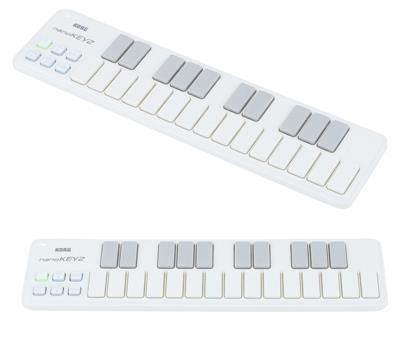
This keyboard usually has a price around 55.00 €
Now that we’ve seen the features of this keyboard Korg nanoKEY 2 white watch these related videos to learn more.
Post you may be interested in
- Ranking with the best midi keyboards
- My selection of cheap midi keyboards.
- Best MIDI Software to work with.
- MIDI Basic Guide.
- Midi Keyboards by Brand.
Some comments from people who come to the forum about this model:
Comment:
Pros:
Cheep and very portable, this is the single reasons why you should get it.
Mine had a code for many promotional lite variations of vst synths, reason limited and a 50$ discount coupon for ableton pc software, some could find those of good use.
Cheep and very portable, this is the single reasons why you should get it.
Mine had a code for many promotional lite variations of vst synths, reason limited and a 50$ discount coupon for ableton pc software, some could find those of good use.
Cons:
Keys are a little mushy which some could find quite uncomfortable, you’d want it had scissor switches or something like that.
::::____
I suggest you set the velocity curve to hard, otherwise the velocity appears only a little restricted.
8-MONTHS-OF-USE-EDIT:
I’m afraid I can no longer suggest this system, this has a serious design flaw that would make me personally definitely livid because it was the only thing I might use inside my voyage.
You can push down in the secrets topmost/bottommost as well as the whole key wont get down, just that side you forced down, even leftmost/rightmost so some degree.
This may well not appear to be a concern, however it is.
to obtain consistent velocity you’ll want to push regarding the secrets dead centre, the above mentioned example just shows the root cause. There’s a reason all long secrets on a computer keyboard have actually an hinge that is extra its to avoid this dilemma.
If the nanokey had vertical rails at the end and top points this issue wouldn’t exist.
I guess I’ll be actually adding this myself.
The bundled pc software is fairly apologetic though.
Reason Limited (one of the best restricted version daws I’ve utilized, nevertheless restricted though), Ableton live 50$ coupon, AAS analogue, strum, Rhodes session (not very helpful), korg m1 LE (useful for noises of that period), ezdrummer lite, (useful) and UVI Digital Synsations (useful, retail price is $199.00)
19-MONTHS-OF-USE-EDIT:
After, in the part, utilising the akai lpk 25 for around a year and changing it to decrease the deadzone greatly, I’m considering buying another nanokey, for even faster and much more comfortable very fast monophonic triggering of notes.
Comment:
Very cool little midi keyboard, does everything is designed to do, but remember that the tips are constructed with pure synthetic and can therefore produce the noise of a cheap computer keyboard.
Still because of this cost, it works as intended, but does no wonder.
Korg nanoKEY 2 white vs Akai MPK mini Mk2
The keyboard Korg nanoKEY 2 whiteis usually 33 € cheaper than Akai MPK mini Mk2, but the difference is so small that this can vary..
And then a video of the keyboard
|
Korg nanoKEY 2 white |
Akai MPK mini Mk2 |
|---|---|
|
|
And then a video of the keyboardAkai MPK mini Mk2
If you want to know more about this option, click on the following link to see the Akai MPK mini Mk2 review
Korg nanoKEY 2 white vs Akai LPK 25
The keyboard Korg nanoKEY 2 white is usually 11 € more expensive than Akai LPK 25, but the difference is so small that this can vary..
And then a video of the keyboard
|
Korg nanoKEY 2 white |
Akai LPK 25 |
|---|---|
|
|
And then a video of the keyboardAkai LPK 25
If you want to know more about this option, click on the following link to see the Akai LPK 25 review
Korg nanoKEY 2 white vs Swissonic EasyKey 49
The keyboard Korg nanoKEY 2 whiteis usually 14 € cheaper than Swissonic EasyKey 49, but the difference is so small that this can vary..
And then a video of the keyboard
|
Korg nanoKEY 2 white |
Swissonic EasyKey 49 |
|---|---|
|
|
And then a video of the keyboardSwissonic EasyKey 49
If you want to know more about this option, click on the following link to see the Swissonic EasyKey 49 review
Korg nanoKEY 2 white vs Arturia Keystep
The keyboard Korg nanoKEY 2 whiteis usually 56 € cheaper than Arturia Keystep.
And then a video of the keyboard
|
Korg nanoKEY 2 white |
Arturia Keystep |
|---|---|
|
|
And then a video of the keyboardArturia Keystep
If you want to know more about this option, click on the following link to see the Arturia Keystep review
Where to buy the keyboard Korg nanoKEY 2 white
Thomann
- Free Shipping.
- Full warranty. If you have any problems, they take care of everything.
- 100% reliable payment.
- Leader in trouble-free shipping.
- Usually Best price.
- Best Reputation: They are the leading online store in Europe and have the best catalogue and information.
Amazon
- Free Shipping and possibility of shipping in one day with Amazon Premium.
- Full Guarantee but they are no experts in music equipment.
- Sometimes better price.
- He’s got worse stock than Thomann.
Also look at these models with a similar price and features:
- Novation Launchkey Mini MK3
- Akai MPK mini Mk2
- Akai MPK miniplay
- Roli Lightpad Block M Studio Ed.
- Arturia MiniLab MKII
- Roli Beatmaker Kit
- Novation Impulse 25
- Akai MPK mini MK2 white
- Alesis V25
- CME Xkey Air 25
- IK Multimedia iRig Keys I/O 25
- Akai APC Keys 25
- Akai LPK 25
- M-Audio Code 25 black
- Native Instruments Komplete Kontrol A25
- Novation Launchkey Mini MK2
- Alesis V mini
- Arturia MicroLab Black
- Akai LPK 25 wireless
- Akai MPK mini Limited Black
- Arturia MiniLab MKII Inverted Edition
- M-Audio Oxygen 25 Mk4
- Korg nanoKEY Studio
- Swissonic EasyKey 25
- Korg nanoKEY 2 black
- Korg nanoKEY 2 Limited Orange
- Korg nanoKEY 2 Limited Blue
- Akai MPK mini MK2 white – AIEP3 Bdl
- Nektar Impact LX25+
- Novation Launchkey 25 MK2
- Alesis Q25
- Akai MPK 225
- Korg microKEY 25
- Miditech Midistart Music 25
- Alesis VI25
- Korg nanoKEY 2 white
- Arturia MicroLab Blue
- Nektar SE25
- Korg microKEY Air 25
- IK Multimedia iRig Keys 25
- Midiplus X2 mini
- Icon iKeyboard 3X
- Keith McMillen K-Board
- CME Xkey 25 silver
- Native Instruments Komplete Kontrol M32
- Alesis V49
- Arturia Keystep Black Edition
- Swissonic EasyKey 49
- Arturia Keystep
- Arturia KeyLab Essential 49
- Nektar Impact LX49+
- M-Audio Code 49 Black
- IK Multimedia iRig Keys 2 Pro
- M-Audio Keystation 49 MK3
- M-Audio Keystation Mini 32 MK3
- Novation Impulse 49
- Nektar Impact GX 49
- Novation Launchkey 49 Mk2
- Native Instruments Komplete Kontrol A49
- M-Audio Oxygen 49 Mk4
- Alesis Q49 Keyboard Controller
- Roland A-300 Pro
- IK Multimedia iRig Keys I/O 49
- Alesis VI49
- Midiplus AK490
- Alesis Vortex Wireless 2
- M-Audio Axiom Air Mini 32
- Alesis Vortex Wireless 2 Red
- IK Multimedia iRig Keys 37 Pro
- Arturia KeyLab Essential 49 BE
- Haken Audio Continuum Half Size
- CME Xkey 37 LE
- IK Multimedia iRig Keys Pro
- Korg microKEY 49 MkII
- IK Multimedia iRig Keys 2
- Miditech Midistart Music 49
- Roland A-49 Black
- Korg microKEY 37 MkII
- Swissonic ControlKey 49
- Roland A-500 PRO
- Nektar SE49
- Korg microKEY Air 37
- Korg microKEY Air 49
- Roland A-49 White
- Nektar Panorama T4
- Miditech Garagekey mini
- Miditech Minicontrol-32
- Midiplus X3 mini
- Miditech i2-Control 37 Black
- Icon iKeyboard 4X
- Miditech i2-mini 32
- Midiplus X4 mini
- Miditech i2-mini 32 Bluetooth
- Icon iKeyboard 5X
- Acorn Masterkey 49
- M-Audio Code 61 Black
- Arturia KeyLab Essential 61
- Nektar Impact GX 61
- M-Audio Keystation 61 MK3
- Alesis V61
- Native Instruments Komplete Kontrol A61
- Swissonic EasyKey 61
- M-Audio Oxygen 61 Mk4
- Roland A-800 Pro
- Korg microKEY Air 61
- GSi DMC-122
- Nektar Impact LX61+
- Alesis VI61
- Novation Launchkey 61 MK2
- Icon iKeyboard 6X
- Acorn Masterkey 61
- Miditech i2-61 Black Edition
- Midiplus X6 mini
- Korg microKEY 61 MkII
- Midiplus X-6 II
- Viscount Physis Piano K5 EX
- M-Audio Keystation 88 MkII
- Kawai VPC1
- Doepfer LMK2+ 88 GH
- Doepfer LMK4+ 88 GH black
- Swissonic ControlKey 88
- Viscount Physis Piano K4 EX
- Doepfer LMK4+ 88 GH grey
- Nektar Impact LX88+
- Haken Audio Continuum Full Size
- Midiplus Stage 88
- Studiologic Numa Concert
- Icon iKeyboard 8X
- Doepfer LMK2+ 88 GH without Case
- Midiplus X-8 II
- Doepfer LMK4+ 88 GH GR without Case

Review MIDI keyboard Novation Launchkey Mini MK2. Where to buy it?
I’ll tell you how this post is built. First I list the features of the Novation Launchkey Mini MK2 keyboard. Then you have a video or two, purchase links and useful comments from other users and then you have one of the most useful parts; comparison tables with similar keyboards so you can compare.
- 16 Velocity-dependent Publish Pads Tri-colour with LEDs
- 7 Function keys
- 2 Performance secrets
- 8 Rotating control knobs
- Power supply via USB
- Compatible with Mac, Computer and iPad (requires Camera Connection Kit – perhaps not included)
- Dimensions (W x L x D): 325 x 175 x 43 mm
- body weight: 675 g
- Incl. Ableton Live Lite, Novation’s Soft-Synth Bass Station and V-Station as well as Loopmasters samples
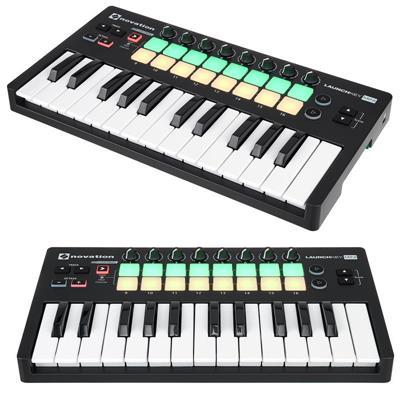
This keyboard usually has a price around 69.00 €
Now that we’ve seen the features of this keyboard Novation Launchkey Mini MK2 watch these related videos to learn more.
Post you may be interested in
- Ranking with the best midi keyboards
- My selection of cheap midi keyboards.
- Best MIDI Software to work with.
- MIDI Basic Guide.
- Midi Keyboards by Brand.
Some comments from people who come to the forum about this model:
Comment:
This keyboard could be the perfect option for a laptop computer setup! Because this keyboard is tiny, has 8 knobs to mess around with (I prefer to utilize the knobs to regulate cutoff and FXs etc.) and 16 drum pads to create beats with additionally the pricing isn’t too harmful to budget manufacturers either!
This keyboard is quite simple to setup, just plug it into the usb port.
the sole flaws with this particular product would be the knobs which can be too free (at the least for me personally), however they are usable. The flaw that is second the tips. They have been kinda springy-ish so a while is taken by it getting accustomed them. Also the velocity is kinda crazy along with hitting super difficult to get a significant noise, however, if you are using a DAW (that you simply probably will be using anyways with this specific keyboard) you’ll just go right to the settings and turn the velocity establishing down, so it does not make a difference how hard you press you’ll always get a good volume.
This keyboard is also awesome searching, nice matte-ish black with orange base.
Conclusion:
Really solid keyboard to take with one to the school, park… or you just want a small keyboard that wont take all of the area in your desk this is certainly a good choose. Has sufficient knobs and pads to mess around with and feels good and sturdy.
Comment:
I had the Novation Launchkey Mini MK2 for around 6 thirty days now
it is one of the most mini midi that i have came across that have a very intuitive function over Ableton, feel well when you play it and it’s really an easy task to get used too, good quality nice led colored.
The secrets a bit in the tiny part but comparing for the employment of it together with mobility it’s really nice.
it is one of the most mini midi that i have came across that have a very intuitive function over Ableton, feel well when you play it and it’s really an easy task to get used too, good quality nice led colored.
The secrets a bit in the tiny part but comparing for the employment of it together with mobility it’s really nice.
Novation Launchkey Mini MK2 vs Akai MPK mini Mk2
The keyboard Novation Launchkey Mini MK2is usually 19 € cheaper than Akai MPK mini Mk2, but the difference is so small that this can vary..
And then a video of the keyboard
|
Novation Launchkey Mini MK2 |
Akai MPK mini Mk2 |
|---|---|
|
|
And then a video of the keyboardAkai MPK mini Mk2
If you want to know more about this option, click on the following link to see the Akai MPK mini Mk2 review
Novation Launchkey Mini MK2 vs Akai LPK 25
The keyboard Novation Launchkey Mini MK2 is usually 25 € more expensive than Akai LPK 25, but the difference is so small that this can vary..
And then a video of the keyboard
|
Novation Launchkey Mini MK2 |
Akai LPK 25 |
|---|---|
|
|
And then a video of the keyboardAkai LPK 25
If you want to know more about this option, click on the following link to see the Akai LPK 25 review
Novation Launchkey Mini MK2 vs Swissonic EasyKey 49
The keyboard Novation Launchkey Mini MK2is usually 0 € cheaper than Swissonic EasyKey 49, but the difference is so small that this can vary..
And then a video of the keyboard
|
Novation Launchkey Mini MK2 |
Swissonic EasyKey 49 |
|---|---|
|
|
And then a video of the keyboardSwissonic EasyKey 49
If you want to know more about this option, click on the following link to see the Swissonic EasyKey 49 review
Novation Launchkey Mini MK2 vs Arturia Keystep
The keyboard Novation Launchkey Mini MK2is usually 42 € cheaper than Arturia Keystep, but the difference is so small that this can vary..
And then a video of the keyboard
|
Novation Launchkey Mini MK2 |
Arturia Keystep |
|---|---|
|
|
And then a video of the keyboardArturia Keystep
If you want to know more about this option, click on the following link to see the Arturia Keystep review
Where to buy the keyboard Novation Launchkey Mini MK2
Thomann
- Free Shipping.
- Full warranty. If you have any problems, they take care of everything.
- 100% reliable payment.
- Leader in trouble-free shipping.
- Usually Best price.
- Best Reputation: They are the leading online store in Europe and have the best catalogue and information.
Amazon
- Free Shipping and possibility of shipping in one day with Amazon Premium.
- Full Guarantee but they are no experts in music equipment.
- Sometimes better price.
- He’s got worse stock than Thomann.
Also look at these models with a similar price and features:
- Novation Launchkey Mini MK3
- Akai MPK mini Mk2
- Akai MPK miniplay
- Roli Lightpad Block M Studio Ed.
- Arturia MiniLab MKII
- Roli Beatmaker Kit
- Novation Impulse 25
- Akai MPK mini MK2 white
- Alesis V25
- CME Xkey Air 25
- IK Multimedia iRig Keys I/O 25
- Akai APC Keys 25
- Akai LPK 25
- M-Audio Code 25 black
- Native Instruments Komplete Kontrol A25
- Novation Launchkey Mini MK2
- Alesis V mini
- Arturia MicroLab Black
- Akai LPK 25 wireless
- Akai MPK mini Limited Black
- Arturia MiniLab MKII Inverted Edition
- M-Audio Oxygen 25 Mk4
- Korg nanoKEY Studio
- Swissonic EasyKey 25
- Korg nanoKEY 2 black
- Korg nanoKEY 2 Limited Orange
- Korg nanoKEY 2 Limited Blue
- Akai MPK mini MK2 white – AIEP3 Bdl
- Nektar Impact LX25+
- Novation Launchkey 25 MK2
- Alesis Q25
- Akai MPK 225
- Korg microKEY 25
- Miditech Midistart Music 25
- Alesis VI25
- Korg nanoKEY 2 white
- Arturia MicroLab Blue
- Nektar SE25
- Korg microKEY Air 25
- IK Multimedia iRig Keys 25
- Midiplus X2 mini
- Icon iKeyboard 3X
- Keith McMillen K-Board
- CME Xkey 25 silver
- Native Instruments Komplete Kontrol M32
- Alesis V49
- Arturia Keystep Black Edition
- Swissonic EasyKey 49
- Arturia Keystep
- Arturia KeyLab Essential 49
- Nektar Impact LX49+
- M-Audio Code 49 Black
- IK Multimedia iRig Keys 2 Pro
- M-Audio Keystation 49 MK3
- M-Audio Keystation Mini 32 MK3
- Novation Impulse 49
- Nektar Impact GX 49
- Novation Launchkey 49 Mk2
- Native Instruments Komplete Kontrol A49
- M-Audio Oxygen 49 Mk4
- Alesis Q49 Keyboard Controller
- Roland A-300 Pro
- IK Multimedia iRig Keys I/O 49
- Alesis VI49
- Midiplus AK490
- Alesis Vortex Wireless 2
- M-Audio Axiom Air Mini 32
- Alesis Vortex Wireless 2 Red
- IK Multimedia iRig Keys 37 Pro
- Arturia KeyLab Essential 49 BE
- Haken Audio Continuum Half Size
- CME Xkey 37 LE
- IK Multimedia iRig Keys Pro
- Korg microKEY 49 MkII
- IK Multimedia iRig Keys 2
- Miditech Midistart Music 49
- Roland A-49 Black
- Korg microKEY 37 MkII
- Swissonic ControlKey 49
- Roland A-500 PRO
- Nektar SE49
- Korg microKEY Air 37
- Korg microKEY Air 49
- Roland A-49 White
- Nektar Panorama T4
- Miditech Garagekey mini
- Miditech Minicontrol-32
- Midiplus X3 mini
- Miditech i2-Control 37 Black
- Icon iKeyboard 4X
- Miditech i2-mini 32
- Midiplus X4 mini
- Miditech i2-mini 32 Bluetooth
- Icon iKeyboard 5X
- Acorn Masterkey 49
- M-Audio Code 61 Black
- Arturia KeyLab Essential 61
- Nektar Impact GX 61
- M-Audio Keystation 61 MK3
- Alesis V61
- Native Instruments Komplete Kontrol A61
- Swissonic EasyKey 61
- M-Audio Oxygen 61 Mk4
- Roland A-800 Pro
- Korg microKEY Air 61
- GSi DMC-122
- Nektar Impact LX61+
- Alesis VI61
- Novation Launchkey 61 MK2
- Icon iKeyboard 6X
- Acorn Masterkey 61
- Miditech i2-61 Black Edition
- Midiplus X6 mini
- Korg microKEY 61 MkII
- Midiplus X-6 II
- Viscount Physis Piano K5 EX
- M-Audio Keystation 88 MkII
- Kawai VPC1
- Doepfer LMK2+ 88 GH
- Doepfer LMK4+ 88 GH black
- Swissonic ControlKey 88
- Viscount Physis Piano K4 EX
- Doepfer LMK4+ 88 GH grey
- Nektar Impact LX88+
- Haken Audio Continuum Full Size
- Midiplus Stage 88
- Studiologic Numa Concert
- Icon iKeyboard 8X
- Doepfer LMK2+ 88 GH without Case
- Midiplus X-8 II
- Doepfer LMK4+ 88 GH GR without Case