
- Home
- Author's Archive:

Review M-Audio Code 25 black MIDI keyboard. Where to buy it?
M-Audio is a business unit of inMusic Brands that designs and markets digital audio and MIDI interfaces, keyboards and MIDI controllers, synthesizers, speakers, studio monitors, digital DJ systems, microphones and music software. I’ll tell you how this post is built. First I’ll list the features of this M-Audio Code 25 black keyboard. Then you have a video or two, shopping links and useful comments from other users and then you have one of the most useful parts; comparison tables with similar keyboards so you can compare.
- 25 full-size keys
- Speed sensitive with aftertouch
- 4 attributable zones for divisions and layers
- XY control pad attributable for HID control
- 16 fully assignable speed-sensitive trigger pads
- 4 encoders three hundred and sixty attributable
- 5 faders attributable
- 5 attributable buttons
- Pitch bend and modulation wheels
- Transport control via Mackie/HUI protocol
- LED gives an instant display of each factor
- Input for volume and sustain pedal
- Powered by USB with 5-pin midi input and output
- Software included: Ableton Live Lite, Hybrid thirty and Loom by Air Music Technology
- Input for power supply, not included.
- Dimensions: 528mm x 257mm x 73mm (width x depth x height)
- Weight: 2,6Kg
- Color: Black
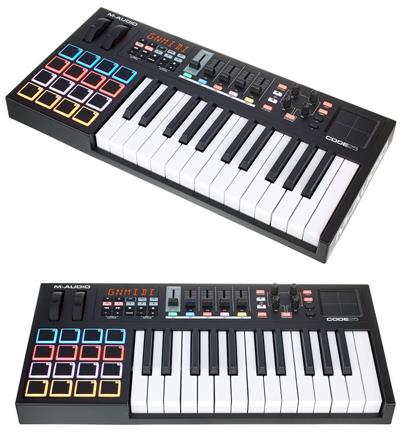
It also offers 4 assignable zones for divisions and layers, 1 assignable XY control pad, 16 fully assignable velocity-sensitive trigger pads, 4 assignable knobs, 5 assignable faders, 5 assignable buttons, and pitch bend and modulation wheels.
The M-Audio Code 25 can be USB powered, but also offers an external power supply input, which is not included. It provides a MIDI output.
Included with the product are Ableton Live Lite, Hybrid 30 and Loom by Air Music Technology software.
Now that we’ve seen the features of this M-Audio Code 25 black keyboard, check out these related videos to learn more.
Posts you may be interested in
- Ranking with the best midi keyboards
- My selection of cheap midi keyboards.
- Best MIDI Software to work with.
- MIDI Basic Guide.
- Midi Keyboards by Brand.
M-Audio Code 25 black vs M-Audio Oxygen 61 Mk4
The M-Audio Code 25 black MIDI keyboard and the M-Audio Oxygen 61 Mk4 is priced at €155/£133/$154, we will have a very interesting comparison due to the similarity in price. Let’s continue to the face-to-face:
- The M-Audio Code 25 black offers 25 keys with aftertouch, and the M-Audio Oxygen 61 Mk4 offers 61 keys both with velocity sensitivity (intensity in MIDI language)
- The M-Audio Code 25 Black also offers 1 assignable XY control pad, 16 fully assignable speed-sensitive trigger pads, 4 assignable knobs, 5 assignable faders, 5 assignable buttons, and pitch bend and modulation wheels.
- The M-Audio Oxygen 61 Mk4 offers 8 speed-sensitive trigger pads, 8 assignable knobs, 9 assignable faders, and transport buttons for DAW control.
- Both are USB powered, and also accept external power supply input. Both also accept sustain pedal.
- The M-Audio Code 25 Black includes Ableton Live Lite, Hybrid thirty and Loom by Air Music Technology software, while the M-Audio Oxygen 61 Mk4 includes Ableton Live Lite and SONiVOX Twist Synth.
Let’s put the features of these keyboards in a table so you can compare
|
M-Audio Code 25 black |
M-Audio Oxygen 61 Mk4 |
|---|---|
|
|
In this comparison we have again other M-Audio controllers, on one hand, the Code 25 that we have already analyzed, and on the other hand we have the Oxygen 61 Mk4 that offers 8 pads, 8 knobs, 9 faders, transport buttons. They are very similar controllers, however, being of the same price we can comment that the M-Audio Oxygen 61 MK4 is better due to the number of keys and their functions.
Here is a video of the M-Audio Oxygen 61 Mk4 keyboard
If you want to know more about this option, click on the following link to see the M-Audio Oxygen 61 Mk4 review.
M-Audio Code 25 black vs Novation Impulse 49
The M-Audio Code 25 black MIDI keyboard is priced at €155/£133/$154 when the Novation Impulse 49 is priced at €223/£205/$228, with a difference of $83. Let’s go head-to-head:
- The M-Audio Code 25 black offers 25 keys with aftertouch, and the Novation Impulse 49 offers 49 keys both with velocity sensitivity (intensity in MIDI language)
- The M-Audio Code 25 Black also offers 1 assignable XY control pad, 16 fully assignable speed-sensitive trigger pads, 4 assignable knobs, 5 assignable faders, 5 assignable buttons, and pitch bend and modulation wheels.
- The Novation Impulse 49 offers 8 backlit Drum Pads, 9 55mm faders, 9 assignable buttons, 8 rotary knobs, 6 transport keys (rec, play, stop, pause) and pitch bend and modulation wheels.
- Both are USB powered, and also accept external power supply input. Both also accept sustain pedal input. Code 25 has a volume pedal input and Novation has an expression pedal input.
- The M-Audio Code 25 Black includes the Ableton Live Lite, Hybrid thirty and Loom by Air Music Technology software, while the Novation Impulse 49 includes the Xcite+ Software Pack, with Ableton Live Lite.
Let’s put the features of these keyboards in a table so you can compare
|
M-Audio Code 25 black |
Novation Impulse 49 |
|---|---|
|
|
In this comparison we have two very similar controllers, on the one hand, the M-Audio Code 25 that we have already analyzed and the Novation Impulse 49 that offers 49 keys, 8 pads, 9 faders, 9 buttons, 8 knobs, 6 transport buttons and pitch bend and modulation wheels. The latter is better due to its amount of functions and also its semi-weighted keyboard, also have a higher price.
And here is a video of the Novation Impulse 49 keyboard
If you want to know more about this option, click on the following link to see the Novation Impulse 49 review.
M-Audio Code 25 black vs Arturia KeyLab Essential 61
The M-Audio Code 25 black MIDI Keyboard is priced at €155/£133/$154 and the Arturia KeyLab Essential 61 is priced at €239/£215/$240. Let’s take a look at the face-to-face:
- The M-Audio Code 25 black offers 25 keys with aftertouch, and the Arturia KeyLab Essential 61 offers 61 keys both with velocity sensitivity (intensity in MIDI language)
- The M-Audio Code 25 Black also offers 1 assignable XY control pad, 16 fully assignable speed-sensitive trigger pads, 4 assignable knobs, 5 assignable faders, 5 assignable buttons, and pitch bend and modulation wheels.
- The Arturia KeyLab Essential 61 offers 8-speed sensitive pads with Aftertouch, 1 pushable encoder, 9 rotary knobs, 13 assignable buttons, and pitch bend and modulation wheels.
- Both are USB powered, and also accept external power supply input. Both also accept sustain pedal.
- The M-Audio Code 25 Black includes the Ableton Live Lite, Hybrid thirty and Loom by Air Music Technology software, while the Arturia KeyLab Essential 61 includes the Arturia Analog Lab 2, Ableton Live Lite and UVI Grand Piano software.
Let’s put the features of these keyboards in a table so you can compare
|
M-Audio Code 25 black |
Arturia KeyLab Essential 61 |
|---|---|
|
|
In this last comparison we have, the M-Audio Code 25 Black that we have already analyzed before, and the Arturia KeyLab Essential 61 that offers 61 keys, 8 speed-sensitive pads with Aftertouch, 1 clickable encoder, 9 rotary knobs, 13 buttons and tone and modulation wheel. As in the previous comparisons, the Arturia KeyLab Essential 61 has certain advantages and is somewhat better because of its number of keys.
Here is a video of the Arturia KeyLab Essential 61 keyboard
If you want to know more about this option, click on the following link to see the Arturia KeyLab Essential 61 review.
M-Audio Code 25 black vs M-Audio Keystation 88 MkII
The M-Audio Code 25 black MIDI keyboard is priced at €155/£133/$154 and the M-Audio Keystation 88 MkII is priced at €169/£155/$169, but the difference is so small that this may vary depending on which store we ask. Let’s go to the face-to-face:
- The M-Audio Code 25 Black offers 25 keys with aftertouch, and the M-Audio Keystation 88 MKII offers 88 keys both with speed sensitivity (intensity in MIDI language)
- The M-Audio Code 25 Black also offers 1 assignable XY control pad, 16 fully assignable speed-sensitive trigger pads, 4 assignable knobs, 5 assignable faders, 5 assignable buttons, and pitch bend and modulation wheels.
- The M-Audio Keystation 88 MKII also offers the transport and directional buttons to operate DAWs and software and Pitch Bend, Modulation, and Octave controls.
- Both are USB powered, and also accept external power supply input. Both also accept sustain pedal, Code 25 has a volume pedal input and the Keystation has an expression pedal input.
- The M-Audio Code 25 Black includes Ableton Live Lite, Hybrid thirty and Loom by Air Music Technology software, while the M-Audio Keystation 88 MKII includes Ableton Live Lite and SONiVOX Eighty-Eight Ensemble plug-in, a virtual piano instrument that captures a 9-foot Steinway CD327 piano.
Let’s put the features of these keyboards in a table so you can compare
|
M-Audio Code 25 black |
M-Audio Keystation 88 MkII |
|---|---|
|
|
In our first comparison we have two MIDI keyboards of the same brand, very different due to their functions, on one hand, the M-Audio Code 25 Black offers functions such as: 1 XY pad control, 16 pads, 4 knobs, 5 faders, 5 buttons and more, on the other hand, the M-Audio Keystation 88 MkII offers transport buttons, pitch bend controls, modulation and octave controls. If you need a keyboard that offers 2 octaves and a lot of control features, the M-Audio Code 25, and if you’re focusing more on just the keyboard and need an 88-key keyboard, the M-Audio Keystation 88 MkII will be the choice.
Here is a video of the M-Audio Keystation 88 MkII keyboard
If you want to know more about this option, click on the following link to see the M-Audio Keystation 88 MkII review
Where to buy the M-Audio Code 25 black
Thomann
- Free Shipping.
- Full warranty. If you have any problems, they take care of everything.
- 100% reliable payment.
- A leader in trouble-free shipping.
- Usually the Best price.
- Best Reputation: They are the leading online store in Europe and have the best catalog and information.
Amazon
- Free Shipping and the possibility of shipping in one day with Amazon Premium.
- Full Guarantee but they are no experts in music equipment.
- Sometimes a better price.
- He’s got worse stock than Thomann.
Also, look at these models with a similar price and features:
- Novation Launchkey Mini MK3
- Akai MPK mini Mk2
- Akai MPK miniplay
- Roli Lightpad Block M Studio Ed.
- Arturia MiniLab MKII
- Roli Beatmaker Kit
- Novation Impulse 25
- Akai MPK mini MK2 white
- Alesis V25
- CME Xkey Air 25
- IK Multimedia iRig Keys I/O 25
- Akai APC Keys 25
- Akai LPK 25
- M-Audio Code 25 black
- Native Instruments Komplete Kontrol A25
- Novation Launchkey Mini MK2
- Alesis V mini
- Arturia MicroLab Black
- Akai LPK 25 wireless
- Akai MPK mini Limited Black
- Arturia MiniLab MKII Inverted Edition
- M-Audio Oxygen 25 Mk4
- Korg nanoKEY Studio
- Swissonic EasyKey 25
- Korg nanoKEY 2 black
- Korg nanoKEY 2 Limited Orange
- Korg nanoKEY 2 Limited Blue
- Akai MPK mini MK2 white – AIEP3 Bdl
- Nektar Impact LX25+
- Novation Launchkey 25 MK2
- Alesis Q25
- Akai MPK 225
- Korg microKEY 25
- Miditech Midistart Music 25
- Alesis VI25
- Korg nanoKEY 2 white
- Arturia MicroLab Blue
- Nektar SE25
- Korg microKEY Air 25
- IK Multimedia iRig Keys 25
- Midiplus X2 mini
- Icon iKeyboard 3X
- Keith McMillen K-Board
- CME Xkey 25 silver
- Native Instruments Komplete Kontrol M32
- Alesis V49
- Arturia Keystep Black Edition
- Swissonic EasyKey 49
- Arturia Keystep
- Arturia KeyLab Essential 49
- Nektar Impact LX49+
- M-Audio Code 49 Black
- IK Multimedia iRig Keys 2 Pro
- M-Audio Keystation 49 MK3
- M-Audio Keystation Mini 32 MK3
- Novation Impulse 49
- Nektar Impact GX 49
- Novation Launchkey 49 Mk2
- Native Instruments Komplete Kontrol A49
- M-Audio Oxygen 49 Mk4
- Alesis Q49 Keyboard Controller
- Roland A-300 Pro
- IK Multimedia iRig Keys I/O 49
- Alesis VI49
- Midiplus AK490
- Alesis Vortex Wireless 2
- M-Audio Axiom Air Mini 32
- Alesis Vortex Wireless 2 Network
- IK Multimedia iRig Keys 37 Pro
- Arturia KeyLab Essential 49 BE
- Haken Audio Continuum Half Size
- CME Xkey 37 LE
- IK Multimedia iRig Keys Pro
- Korg microKEY 49 MkII
- IK Multimedia iRig Keys 2
- Miditech Midistart Music 49
- Roland A-49 Black
- Korg microKEY 37 MkII
- Swissonic ControlKey 49
- Roland A-500 PRO
- Nektar SE49
- Korg microKEY Air 37
- Korg microKEY Air 49
- Roland A-49 White
- Nektar Panorama T4
- Miditech Garagekey mini
- Miditech Minicontrol-32
- Midiplus X3 mini
- Miditech i2-Control 37 Black
- Icon iKeyboard 4X
- Miditech i2-mini 32
- Midiplus X4 mini
- Miditech i2-mini 32 Bluetooth
- Icon iKeyboard 5X
- Acorn Masterkey 49
- M-Audio Code 61 Black
- Arturia KeyLab Essential 61
- Nektar Impact GX 61
- M-Audio Keystation 61 MK3
- Alesis V61
- Native Instruments Komplete Kontrol A61
- Swissonic EasyKey 61
- M-Audio Oxygen 61 Mk4
- Roland A-800 Pro
- Korg microKEY Air 61
- GSi DMC-122
- Nektar Impact LX61+
- Alesis VI61
- Novation Launchkey 61 MK2
- Icon iKeyboard 6X
- Acorn Masterkey 61
- Miditech i2-61 Black Edition
- Midiplus X6 mini
- Korg microKEY 61 MkII
- Midiplus X-6 II
- Viscount Physis Piano K5 EX
- M-Audio Keystation 88 MkII
- Kawai VPC1
- Doepfer LMK2+ 88 GH
- Doepfer LMK4+ 88 GH black
- Swissonic ControlKey 88
- Viscount Physis Piano K4 EX
- Doepfer LMK4+ 88 GH grey
- Nektar Impact LX88+
- Haken Audio Continuum Full Size
- Midiplus Stage 88
- Studiologic Numa Concert
- Icon iKeyboard 8X
- Doepfer LMK2+ 88 GH without Case
- Midiplus X-8 II
- Doepfer LMK4+ 88 GH GR without Case

Review MIDI keyboard Native Instruments Komplete Kontrol A25. Where to buy it?
I’ll tell you how this post is built. First I list the features of the Native Instruments Komplete Kontrol A25 keyboard. Then you have a video or two, purchase links and useful comments from other users and then you have one of the most useful parts; comparison tables with similar keyboards so you can compare.
- Newly developed semi-weighted keyboard with 25 secrets
- OLED show
- 8 Touch-sensitive dials
- Pitch and Mod Wheels
- 4D drive encoders
- Smart play
- Machine integration
- Control of Logic ProX, Ableton Live, Garage Band, Cubase and Nuendo
- Power supply via USB
- 6.3 mm Foot pedal (The most important pedal of a piano or keyboard is the sustain pedal and is used to keep the note playing even if you stop pressing the key.) input
- USB port
- Dimensions: 488 x 257 x 89 mm
- Weight: 2.4 kg
- The Gentleman
- Monark
- Scarbee Mark I
- Reactor Prism
- Reactor Blocks Wired
- Reactor 6 player
- Contact 6 Players
- Guitar Rig 5 Player
- Complete Control Software
- Machine Essential

This keyboard usually has a price around 139.00 €
Now that we’ve seen the features of this keyboard Native Instruments Komplete Kontrol A25 watch these related videos to learn more.
https://www.youtube.com/watch?v=
Post you may be interested in
- Ranking with the best midi keyboards
- My selection of cheap midi keyboards.
- Best MIDI Software to work with.
- MIDI Basic Guide.
- Midi Keyboards by Brand.
Some comments from people who come to the forum about this model:
Comment:
For the purchase price, it is a fantastic item. Yes it is plastic all over, nevertheless the create continues to be quite sturdy. There’s nothing end that is high it needless to say. Nevertheless the keys and knobs have a feel that is nice them, and I find playing onto it a pleasure. The display that is small it a little bit difficult to navigate the settings regarding the keyboard. Although that is not actually a challenge because I would rather use the computer to manage the keyboard, and never one other method around for me personally. The real strong point of this product could be the software compatibility, and simple of good use.
Comment:
Its a tremendously well built midi keyboard offering so many good software along with it. Complete size keys and several midi functions
Native Instruments Komplete Kontrol A25 vs Akai MPK mini Mk2
The keyboard Native Instruments Komplete Kontrol A25 is usually 51 € more expensive than Akai MPK mini Mk2.
And then a video of the keyboard
|
Native Instruments Komplete Kontrol A25 |
Akai MPK mini Mk2 |
|---|---|
Includes Complete Instruments and FX:
|
|
And then a video of the keyboardAkai MPK mini Mk2
If you want to know more about this option, click on the following link to see the Akai MPK mini Mk2 review
Native Instruments Komplete Kontrol A25 vs Akai LPK 25
The keyboard Native Instruments Komplete Kontrol A25 is usually 95 € more expensive than Akai LPK 25.
And then a video of the keyboard
|
Native Instruments Komplete Kontrol A25 |
Akai LPK 25 |
|---|---|
Includes Complete Instruments and FX:
|
|
And then a video of the keyboardAkai LPK 25
If you want to know more about this option, click on the following link to see the Akai LPK 25 review
Native Instruments Komplete Kontrol A25 vs Swissonic EasyKey 49
The keyboard Native Instruments Komplete Kontrol A25 is usually 70 € more expensive than Swissonic EasyKey 49.
And then a video of the keyboard
|
Native Instruments Komplete Kontrol A25 |
Swissonic EasyKey 49 |
|---|---|
Includes Complete Instruments and FX:
|
|
And then a video of the keyboardSwissonic EasyKey 49
If you want to know more about this option, click on the following link to see the Swissonic EasyKey 49 review
Native Instruments Komplete Kontrol A25 vs Arturia Keystep
The keyboard Native Instruments Komplete Kontrol A25 is usually 28 € more expensive than Arturia Keystep, but the difference is so small that this can vary..
And then a video of the keyboard
|
Native Instruments Komplete Kontrol A25 |
Arturia Keystep |
|---|---|
Includes Complete Instruments and FX:
|
|
And then a video of the keyboardArturia Keystep
If you want to know more about this option, click on the following link to see the Arturia Keystep review
Where to buy the keyboard Native Instruments Komplete Kontrol A25
Thomann
- Free Shipping.
- Full warranty. If you have any problems, they take care of everything.
- 100% reliable payment.
- Leader in trouble-free shipping.
- Usually Best price.
- Best Reputation: They are the leading online store in Europe and have the best catalogue and information.
Amazon
- Free Shipping and possibility of shipping in one day with Amazon Premium.
- Full Guarantee but they are no experts in music equipment.
- Sometimes better price.
- He’s got worse stock than Thomann.
Also look at these models with a similar price and features:
- Novation Launchkey Mini MK3
- Akai MPK mini Mk2
- Akai MPK miniplay
- Roli Lightpad Block M Studio Ed.
- Arturia MiniLab MKII
- Roli Beatmaker Kit
- Novation Impulse 25
- Akai MPK mini MK2 white
- Alesis V25
- CME Xkey Air 25
- IK Multimedia iRig Keys I/O 25
- Akai APC Keys 25
- Akai LPK 25
- M-Audio Code 25 black
- Native Instruments Komplete Kontrol A25
- Novation Launchkey Mini MK2
- Alesis V mini
- Arturia MicroLab Black
- Akai LPK 25 wireless
- Akai MPK mini Limited Black
- Arturia MiniLab MKII Inverted Edition
- M-Audio Oxygen 25 Mk4
- Korg nanoKEY Studio
- Swissonic EasyKey 25
- Korg nanoKEY 2 black
- Korg nanoKEY 2 Limited Orange
- Korg nanoKEY 2 Limited Blue
- Akai MPK mini MK2 white – AIEP3 Bdl
- Nektar Impact LX25+
- Novation Launchkey 25 MK2
- Alesis Q25
- Akai MPK 225
- Korg microKEY 25
- Miditech Midistart Music 25
- Alesis VI25
- Korg nanoKEY 2 white
- Arturia MicroLab Blue
- Nektar SE25
- Korg microKEY Air 25
- IK Multimedia iRig Keys 25
- Midiplus X2 mini
- Icon iKeyboard 3X
- Keith McMillen K-Board
- CME Xkey 25 silver
- Native Instruments Komplete Kontrol M32
- Alesis V49
- Arturia Keystep Black Edition
- Swissonic EasyKey 49
- Arturia Keystep
- Arturia KeyLab Essential 49
- Nektar Impact LX49+
- M-Audio Code 49 Black
- IK Multimedia iRig Keys 2 Pro
- M-Audio Keystation 49 MK3
- M-Audio Keystation Mini 32 MK3
- Novation Impulse 49
- Nektar Impact GX 49
- Novation Launchkey 49 Mk2
- Native Instruments Komplete Kontrol A49
- M-Audio Oxygen 49 Mk4
- Alesis Q49 Keyboard Controller
- Roland A-300 Pro
- IK Multimedia iRig Keys I/O 49
- Alesis VI49
- Midiplus AK490
- Alesis Vortex Wireless 2
- M-Audio Axiom Air Mini 32
- Alesis Vortex Wireless 2 Red
- IK Multimedia iRig Keys 37 Pro
- Arturia KeyLab Essential 49 BE
- Haken Audio Continuum Half Size
- CME Xkey 37 LE
- IK Multimedia iRig Keys Pro
- Korg microKEY 49 MkII
- IK Multimedia iRig Keys 2
- Miditech Midistart Music 49
- Roland A-49 Black
- Korg microKEY 37 MkII
- Swissonic ControlKey 49
- Roland A-500 PRO
- Nektar SE49
- Korg microKEY Air 37
- Korg microKEY Air 49
- Roland A-49 White
- Nektar Panorama T4
- Miditech Garagekey mini
- Miditech Minicontrol-32
- Midiplus X3 mini
- Miditech i2-Control 37 Black
- Icon iKeyboard 4X
- Miditech i2-mini 32
- Midiplus X4 mini
- Miditech i2-mini 32 Bluetooth
- Icon iKeyboard 5X
- Acorn Masterkey 49
- M-Audio Code 61 Black
- Arturia KeyLab Essential 61
- Nektar Impact GX 61
- M-Audio Keystation 61 MK3
- Alesis V61
- Native Instruments Komplete Kontrol A61
- Swissonic EasyKey 61
- M-Audio Oxygen 61 Mk4
- Roland A-800 Pro
- Korg microKEY Air 61
- GSi DMC-122
- Nektar Impact LX61+
- Alesis VI61
- Novation Launchkey 61 MK2
- Icon iKeyboard 6X
- Acorn Masterkey 61
- Miditech i2-61 Black Edition
- Midiplus X6 mini
- Korg microKEY 61 MkII
- Midiplus X-6 II
- Viscount Physis Piano K5 EX
- M-Audio Keystation 88 MkII
- Kawai VPC1
- Doepfer LMK2+ 88 GH
- Doepfer LMK4+ 88 GH black
- Swissonic ControlKey 88
- Viscount Physis Piano K4 EX
- Doepfer LMK4+ 88 GH grey
- Nektar Impact LX88+
- Haken Audio Continuum Full Size
- Midiplus Stage 88
- Studiologic Numa Concert
- Icon iKeyboard 8X
- Doepfer LMK2+ 88 GH without Case
- Midiplus X-8 II
- Doepfer LMK4+ 88 GH GR without Case

Review MIDI keyboard Novation Launchkey Mini MK2. Where to buy it?
I’ll tell you how this post is built. First I list the features of the Novation Launchkey Mini MK2 keyboard. Then you have a video or two, purchase links and useful comments from other users and then you have one of the most useful parts; comparison tables with similar keyboards so you can compare.
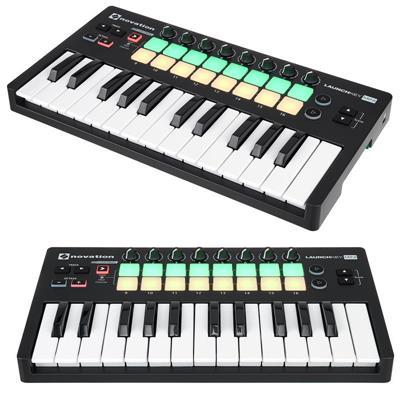
- 16 Velocity-dependent Publish Pads Tri-colour with LEDs
- 7 Function keys
- 2 Performance secrets
- 8 Rotating control knobs
- Power supply via USB
- Compatible with Mac, Computer and iPad (requires Camera Connection Kit – perhaps not included)
- Dimensions (W x L x D): 325 x 175 x 43 mm
- body weight: 675 g
- Incl. Ableton Live Lite, Novation’s Soft-Synth Bass Station and V-Station as well as Loopmasters samples
This keyboard usually has a price around 69.00 €
Now that we’ve seen the features of this keyboard Novation Launchkey Mini MK2 watch these related videos to learn more.
Post you may be interested in
- Ranking with the best midi keyboards
- My selection of cheap midi keyboards.
- Best MIDI Software to work with.
- MIDI Basic Guide.
- Midi Keyboards by Brand.
Some comments from people who come to the forum about this model:
Comment:
This keyboard could be the perfect option for a laptop computer setup! Because this keyboard is tiny, has 8 knobs to mess around with (I prefer to utilize the knobs to regulate cutoff and FXs etc.) and 16 drum pads to create beats with additionally the pricing isn’t too harmful to budget manufacturers either!
This keyboard is quite simple to setup, just plug it into the usb port.
the sole flaws with this particular product would be the knobs which can be too free (at the least for me personally), however they are usable. The flaw that is second the tips. They have been kinda springy-ish so a while is taken by it getting accustomed them. Also the velocity is kinda crazy along with hitting super difficult to get a significant noise, however, if you are using a DAW (that you simply probably will be using anyways with this specific keyboard) you’ll just go right to the settings and turn the velocity establishing down, so it does not make a difference how hard you press you’ll always get a good volume.
This keyboard is also awesome searching, nice matte-ish black with orange base.
Conclusion:
Really solid keyboard to take with one to the school, park… or you just want a small keyboard that wont take all of the area in your desk this is certainly a good choose. Has sufficient knobs and pads to mess around with and feels good and sturdy.
Comment:
I had the Novation Launchkey Mini MK2 for around 6 thirty days now
it is one of the most mini midi that i have came across that have a very intuitive function over Ableton, feel well when you play it and it’s really an easy task to get used too, good quality nice led colored.
The secrets a bit in the tiny part but comparing for the employment of it together with mobility it’s really nice.
it is one of the most mini midi that i have came across that have a very intuitive function over Ableton, feel well when you play it and it’s really an easy task to get used too, good quality nice led colored.
The secrets a bit in the tiny part but comparing for the employment of it together with mobility it’s really nice.
Novation Launchkey Mini MK2 vs Akai MPK mini Mk2
The keyboard Novation Launchkey Mini MK2is usually 19 € cheaper than Akai MPK mini Mk2, but the difference is so small that this can vary..
And then a video of the keyboard
|
Novation Launchkey Mini MK2 |
Akai MPK mini Mk2 |
|---|---|
|
|
And then a video of the keyboardAkai MPK mini Mk2
If you want to know more about this option, click on the following link to see the Akai MPK mini Mk2 review
Novation Launchkey Mini MK2 vs Akai LPK 25
The keyboard Novation Launchkey Mini MK2 is usually 25 € more expensive than Akai LPK 25, but the difference is so small that this can vary..
And then a video of the keyboard
|
Novation Launchkey Mini MK2 |
Akai LPK 25 |
|---|---|
|
|
And then a video of the keyboardAkai LPK 25
If you want to know more about this option, click on the following link to see the Akai LPK 25 review
Novation Launchkey Mini MK2 vs Swissonic EasyKey 49
The keyboard Novation Launchkey Mini MK2is usually 0 € cheaper than Swissonic EasyKey 49, but the difference is so small that this can vary..
And then a video of the keyboard
|
Novation Launchkey Mini MK2 |
Swissonic EasyKey 49 |
|---|---|
|
|
And then a video of the keyboardSwissonic EasyKey 49
If you want to know more about this option, click on the following link to see the Swissonic EasyKey 49 review
Novation Launchkey Mini MK2 vs Arturia Keystep
The keyboard Novation Launchkey Mini MK2is usually 42 € cheaper than Arturia Keystep, but the difference is so small that this can vary..
And then a video of the keyboard
|
Novation Launchkey Mini MK2 |
Arturia Keystep |
|---|---|
|
|
And then a video of the keyboardArturia Keystep
If you want to know more about this option, click on the following link to see the Arturia Keystep review
Where to buy the keyboard Novation Launchkey Mini MK2
Thomann
- Free Shipping.
- Full warranty. If you have any problems, they take care of everything.
- 100% reliable payment.
- Leader in trouble-free shipping.
- Usually Best price.
- Best Reputation: They are the leading online store in Europe and have the best catalogue and information.
Amazon
- Free Shipping and possibility of shipping in one day with Amazon Premium.
- Full Guarantee but they are no experts in music equipment.
- Sometimes better price.
- He’s got worse stock than Thomann.
Also look at these models with a similar price and features:
- Novation Launchkey Mini MK3
- Akai MPK mini Mk2
- Akai MPK miniplay
- Roli Lightpad Block M Studio Ed.
- Arturia MiniLab MKII
- Roli Beatmaker Kit
- Novation Impulse 25
- Akai MPK mini MK2 white
- Alesis V25
- CME Xkey Air 25
- IK Multimedia iRig Keys I/O 25
- Akai APC Keys 25
- Akai LPK 25
- M-Audio Code 25 black
- Native Instruments Komplete Kontrol A25
- Novation Launchkey Mini MK2
- Alesis V mini
- Arturia MicroLab Black
- Akai LPK 25 wireless
- Akai MPK mini Limited Black
- Arturia MiniLab MKII Inverted Edition
- M-Audio Oxygen 25 Mk4
- Korg nanoKEY Studio
- Swissonic EasyKey 25
- Korg nanoKEY 2 black
- Korg nanoKEY 2 Limited Orange
- Korg nanoKEY 2 Limited Blue
- Akai MPK mini MK2 white – AIEP3 Bdl
- Nektar Impact LX25+
- Novation Launchkey 25 MK2
- Alesis Q25
- Akai MPK 225
- Korg microKEY 25
- Miditech Midistart Music 25
- Alesis VI25
- Korg nanoKEY 2 white
- Arturia MicroLab Blue
- Nektar SE25
- Korg microKEY Air 25
- IK Multimedia iRig Keys 25
- Midiplus X2 mini
- Icon iKeyboard 3X
- Keith McMillen K-Board
- CME Xkey 25 silver
- Native Instruments Komplete Kontrol M32
- Alesis V49
- Arturia Keystep Black Edition
- Swissonic EasyKey 49
- Arturia Keystep
- Arturia KeyLab Essential 49
- Nektar Impact LX49+
- M-Audio Code 49 Black
- IK Multimedia iRig Keys 2 Pro
- M-Audio Keystation 49 MK3
- M-Audio Keystation Mini 32 MK3
- Novation Impulse 49
- Nektar Impact GX 49
- Novation Launchkey 49 Mk2
- Native Instruments Komplete Kontrol A49
- M-Audio Oxygen 49 Mk4
- Alesis Q49 Keyboard Controller
- Roland A-300 Pro
- IK Multimedia iRig Keys I/O 49
- Alesis VI49
- Midiplus AK490
- Alesis Vortex Wireless 2
- M-Audio Axiom Air Mini 32
- Alesis Vortex Wireless 2 Red
- IK Multimedia iRig Keys 37 Pro
- Arturia KeyLab Essential 49 BE
- Haken Audio Continuum Half Size
- CME Xkey 37 LE
- IK Multimedia iRig Keys Pro
- Korg microKEY 49 MkII
- IK Multimedia iRig Keys 2
- Miditech Midistart Music 49
- Roland A-49 Black
- Korg microKEY 37 MkII
- Swissonic ControlKey 49
- Roland A-500 PRO
- Nektar SE49
- Korg microKEY Air 37
- Korg microKEY Air 49
- Roland A-49 White
- Nektar Panorama T4
- Miditech Garagekey mini
- Miditech Minicontrol-32
- Midiplus X3 mini
- Miditech i2-Control 37 Black
- Icon iKeyboard 4X
- Miditech i2-mini 32
- Midiplus X4 mini
- Miditech i2-mini 32 Bluetooth
- Icon iKeyboard 5X
- Acorn Masterkey 49
- M-Audio Code 61 Black
- Arturia KeyLab Essential 61
- Nektar Impact GX 61
- M-Audio Keystation 61 MK3
- Alesis V61
- Native Instruments Komplete Kontrol A61
- Swissonic EasyKey 61
- M-Audio Oxygen 61 Mk4
- Roland A-800 Pro
- Korg microKEY Air 61
- GSi DMC-122
- Nektar Impact LX61+
- Alesis VI61
- Novation Launchkey 61 MK2
- Icon iKeyboard 6X
- Acorn Masterkey 61
- Miditech i2-61 Black Edition
- Midiplus X6 mini
- Korg microKEY 61 MkII
- Midiplus X-6 II
- Viscount Physis Piano K5 EX
- M-Audio Keystation 88 MkII
- Kawai VPC1
- Doepfer LMK2+ 88 GH
- Doepfer LMK4+ 88 GH black
- Swissonic ControlKey 88
- Viscount Physis Piano K4 EX
- Doepfer LMK4+ 88 GH grey
- Nektar Impact LX88+
- Haken Audio Continuum Full Size
- Midiplus Stage 88
- Studiologic Numa Concert
- Icon iKeyboard 8X
- Doepfer LMK2+ 88 GH without Case
- Midiplus X-8 II
- Doepfer LMK4+ 88 GH GR without Case