
- Home
- Author's Archive:
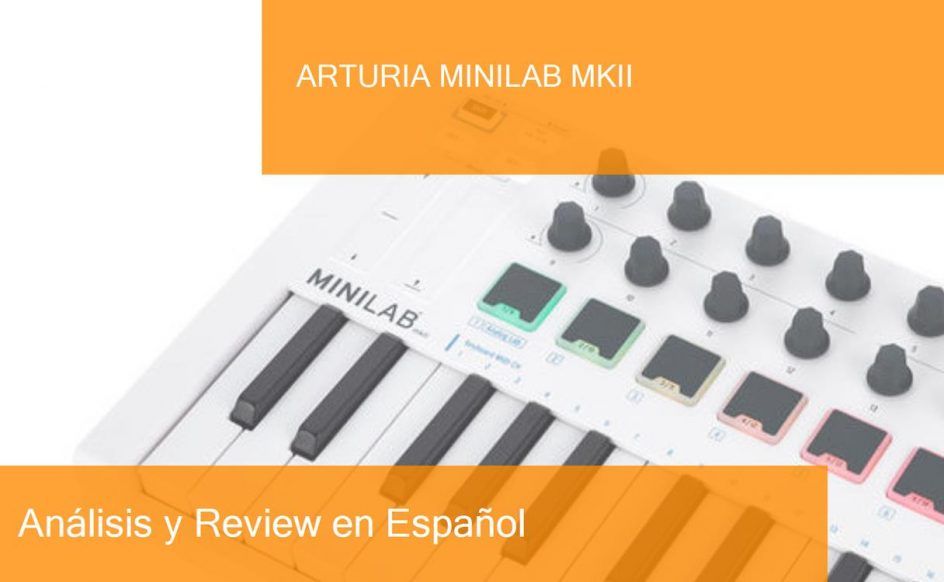
Review MIDI keyboard Arturia MiniLab MKII. Where to buy it?
Arturia is a company based in Grenoble, France, specializing in the development of music software and hardware, with products aimed at both amateurs and professionals. In this post, I first list the features of this Arturia MiniLab MKII keyboard. Then you have a video or two, purchase links and useful comments from other users and then you have one of the most useful parts: comparison tables with similar keyboards so you can compare.
- 25 speed-sensitive mini keys
- 16 rotary encoders (two of them are clickable)
- Two banks of eight-speed and pressure-sensitive pads with RGB backlight
- Touchstrips for pitch bend and modulation.
- Connection for sustain pedal
- USB connection
- Bus-powered
- Dimensions: 355 x 220 x 50mm (width x depth x height)
- Weight: 1,5kg
- Includes license for Analog Lab Lite software with 500 sounds in V-Collection Five quality, Ableton Live Lite and UVI Grand Piano (software requires a download from manufacturer’s site)
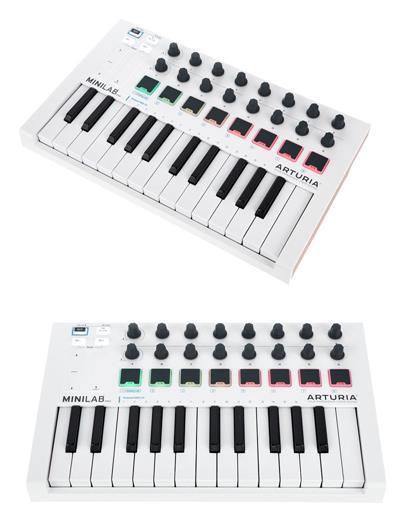
It also has 16 assignable knobs, very useful when recording or mixing, and to control more specifically the parameters of the plugins to be used. We also have 8 sensitive backlit pads to tune percussive rhythms or other samples.
We also have touch strips to control the pitch bend and modulation of the notes in real-time (at the moment they sound). The Arturia MiniLab MKII also has a sustain pedal input and is USB powered, so no external power supply is needed.
Finally, it’s worth remembering that it includes licenses for the Analog Lab Lite software with 500 sounds in V-Collection Five quality, Ableton Live Lite and UVI Grand Piano, which are highly valued by beginners above all.
Now that we have seen the features of this Arturia MiniLab MKII keyboard, watch these related videos to learn more.
Posts you may be interested in
- Ranking with the best midi keyboards
- My selection of cheap midi keyboards.
- Best MIDI Software to work with.
- MIDI Basic Guide.
- Midi Keyboards by Brand.
Arturia MiniLab MKII vs Novation Launchkey Mini MK3
The Arturia MiniLab MkII MIDI Keyboard is priced at €91/£82/$91 while the Novation Launchkey Mini MK3 is priced at €98/£89/$99, but the difference is so small that this may vary depending on the shop where you ask.
- Both have 25 speed-sensitive mini keys (intensity according to MIDI language).
- The Arturia offers 16 assignable rotary encoders (knobs), 8 sensitive pads with RGB feedback (RedGreenBlue), and pitch bend and modulation touch strips. In contrast, the Novation gives 8 assignable encoders and 16 RGB pads with sensitivity.
- Both have input jacks for sustain pedal, USB port, and USB power, the miniplay also runs on 3 AA batteries.
- The Arturia includes the Analog Lab Lite software license with 500 sounds in V-Collection Five quality, Ableton Live Lite, and UVI Grand Piano. The Novation includes the Bundle software.
- The Arturia Minilab MKII has the dimensions of 317 x 181 x 44 mm and a weight of 1.5 kg, while the Novation Launchkey Mini MK3 has the dimensions (W x H x D): 330 x 41 x 172 mm and a weight of 689g.
Let’s put the features of these keyboards in a table so you can compare
|
Arturia MiniLab MKII |
Novation Launchkey Mini MK3 |
|---|---|
|
|
These are very similar MIDI controllers, where the Novation stands out because of its fixed-chord mode and transport buttons (to go back, stop, forward, etc). The Arturia is licensed as a V-Collection Five, Ableton Live Lite, and UVI Grand Piano. Besides having such a similar price, it gives us a greater difficulty to lean for one as a better controller. However, if you want to have more encoders in your controller, go for the Arturia MiniLab MKII and if you want to have more pads, your choice will be the Novation Launchkey Mini MK3.
And here’s a video of the Novation Launchkey Mini MK3
If you want to know more about this option, click on the following link to see the Novation Launchkey Mini MK3 review.
Arturia MiniLab MKII vs Akai MPK mini MK2
The Arturia MiniLab MkII MIDI Keyboard is priced at €91/£82/$91 when the Akai MPK mini MK2 white is priced at €79/£70/$81, but the difference is so small that this may vary.
- Both have 25 speed-sensitive mini keys (intensity according to the MIDI language).
- The Arturia offers 16 assignable rotary encoders (knobs), 8 sensitive pads with RGB feedback (RedGreenBlue). The Akai offers 8 assignable encoders and 8 RGB pads with sensitivity. In addition to a four-way thumbstick control.
- Both have an input jack for sustain pedal, USB port, and USB power.
- The Arturia includes the Analog Lab Lite software license with 500 sounds in V-Collection Five, Ableton Live Lite, and UVI Grand Piano quality. The Akai includes Hybrid three by AIR Music Tech, SONiVOX Wobble, and Akai Pro MPC Essentials software.
- The Arturia Minilab MKII has the dimensions of 355 x 220 x 50mm and a weight of 1.5 kg, while the Akai MPK mini MK2 has the dimensions (W x H x D): 317 x 181 x 44 mm and a weight of 748 g.
Let’s put the features of these keyboards in a table so you can compare
|
Arturia MiniLab MKII |
Akai MPK mini MK2 |
|---|---|
|
|
|
And here is a video of the Akai MPK mini MK2 white keyboard
https://www.youtube.com/watch?v=9jHtGcP7U4Q
Again we have two very similar controllers, where the Arturia has twice as many assignable knobs, reaching 16. In downloadable licenses, the Arturia offers Analog Lab Lite with five hundred sounds in V-Collection Five quality, Ableton Live Lite, and UVI Grand Piano, while the Akai offers a four-way thumbstick control and licenses Hybrid Three by AIR Music Tech, SONiVOX Wobble, and Akai Pro MPC Essentials.
If you want to know more about this option, click on the following link to see the Akai MPK mini MK2 white review.
Arturia MiniLab MKII vs Alesis V25
The Arturia MiniLab MkII MIDI Keyboard is priced at €91/£82/$91 and the Alesis V25 is priced at €75/£66/$73, but the difference is so small that this may vary.
- The Arturia has 25 speed-sensitive mini keys (intensity according to MIDI language). While the Alesis has 25 full-size keys also sensitive.
- The Arturia offers 16 assignable rotary encoders (knobs), 8 sensitive pads with RGB (RedGreenBlue) feedback. The Alesis offers 4 assignable encoders, 4 assignable buttons, and 8 RGB pads with sensitivity.
- Both have an input jack for sustain pedal, USB port, and USB power.
- The Arturia includes the Analog Lab Lite software license with 500 sounds in V-Collection Five quality, Ableton Live Lite, and UVI Grand Piano. The Alesis includes Ableton Live Lite software (download) and xpand!2 by Air Music Tech software (download)
Let’s put the features of these keyboards in a table so you can compare
|
Arturia MiniLab MKII |
Alesis V25 |
|---|---|
|
|
And then a video of the Alesis V25 keyboard
We now have good MIDI controllers, with notable differences between them. The Alesis has, as we saw in the face-to-face, 25 full-size keys, 8 backlit pads, and 4 assignable knobs and buttons, plus pitch bend and modulation wheels. In the Arturia we have 25 mini keys, 8 pads, and 16 assignable control knobs. I would go for the full-size keys on the Alesis.
If you want to know more about this option, click on the following link to see the Alesis V25 review.
Arturia MiniLab MKII vs Native Instruments Komplete Kontrol M32
The Arturia MiniLab MkII MIDI Keyboard is priced at €91/£82/$91 when the Native Instruments Komplete Kontrol M32 is priced at €105/£98/$108.
- The Arturia has 25 speed-sensitive mini keys (intensity according to MIDI language). When the Native Instruments has 32 mini-keys equally sensitive.
- The Arturia offers 16 assignable rotary encoders (knobs), 8 sensitive pads with RGB feedback (RedGreenBlue). The Kontrol M32 offers 8 assignable encoders and two touch strips for pitch bend and modulation. In addition to a 4D push-button encoder.
- Both have an input jack for the sustain pedal, USB port, and USB power.
- The Arturia includes the Analog Lab Lite software license with 500 sounds in V-Collection Five, Ableton Live Lite, and UVI Grand Piano quality. The Kontrol M32 includes the software Monark, Scarbee Mark I, Reaktor Prism, Komplete Kontrol Software, Maschine Essentials, Komplete Start, Ableton Live 10 Lite. Plus intuitive control over the DAWs: Logic Pro X, Ableton Live, Garage Band, Cubase, and Nuendo.
- The Arturia Minilab MKII has dimensions of 355 x 220 x 50mm and a weight of 1.5 kg, while the Native Instruments Kompletete Kontrol M32 has dimensions of (W x H x D): 475 x 167 x 50 mm and a weight of 1.45 kg.
Let’s put the features of these keyboards in a table so you can compare
|
Arturia MiniLab MKII |
Native Instruments Komplete Kontrol M32 |
|---|---|
|
|
|
In this comparison, we did find differences. The Native Instruments Komplete Kontrol M32 offers certain more functions for a really low price, starting with the 32 mini keys when the Arturia gives us 25. The Arturia has 16 encoders and 8 pads, where the Kontrol only has 8 encoders, 0 pads, but a 4D push-button encoder. If you prefer to have a 3-octave keyboard, you will go for the M32. If you prefer the pads, your choice will be the Arturia.
And here is a video of the Native Instruments Komplete Kontrol M32
If you want to know more about this option, click on the following link to see the Native Instruments Komplete Kontrol M32 review.
Arturia MiniLab MKII vs Akai LPK 25
The Arturia MiniLab MkII MIDI Keyboard is priced at €91/£82/$91 while the Akai LPK 25 is priced at €42/£37/$42. With a considerable difference in price, this will be an interesting comparison.
- Both have 25 speed-sensitive mini keys (intensity according to the MIDI language).
- The Arturia offers 16 assignable rotary encoders (knobs), 8 sensitive pads with RGB feedback (RedGreenBlue). The Akai offers octave up/down buttons, sustain button, and tap tempo. It’s really very basic.
- Both have an input jack for sustain pedal, USB port, and USB power.
- The Arturia includes the Analog Lab Lite software license with 500 sounds in V-Collection Five quality, Ableton Live Lite, and UVI Grand Piano. The Akai is Plug and Play and works with virtually all audio software.
- The Arturia Minilab MKII has the dimensions of 355 x 220 x 50mm and a weight of 1.5 kg, while the Akai MPK mini MK2 has the dimensions (W x H x D): 9.65 x 34.04 x 2.79 cm and a weight of 635 g.
Let’s put the features of these keyboards in a table so you can compare
|
Arturia MiniLab MKII |
Akai LPK 25 |
|---|---|
|
|
And here is a video of the LPK 25 Akai keyboard
We have a comparison, between MIDI controllers, very different. On the one hand the Arturia, with all its functions and features that give us more control comfort in the DAW to be used, and on the other hand the Akai LPK 25 with a very small and minimalist design besides being very basic, with 25 mini-classes and up/down octave buttons, tap tempo and sustain. If you have the budget to go for the Arturia, go for it. If you feel you don’t need all its features and want a more minimalist, very portable, and lightweight MIDI keyboard the Akai LPK 25 will be your best choice.
If you want to know more about this option, click on the following link to see the Akai LPK 25 review.
Which is the best of these MIDI keyboards if I am a beginner on a low budget?
While the answer to this question lies mostly in what specific need you have, for example, if you want to have a keyboard with the widest range of notes possible, or if you want to have as many control functions as possible, or perhaps a mix between the two, that is without leaving behind the different connections and software licenses that most MIDI controllers offer, we will give an objective opinion according to our experience in music production and thus also with the price that the controllers demand, a kind of value for money.
While the Arturia MiniLab MKII is an excellent choice of MIDI controller, we can also comment that the Akai MPK mini MK2 white is a better choice, taking into account its slightly lower price and also its great set of control functions it offers, its compact and portable design, make the Akai MPK mini MK2 white one of the best MIDI controller options in its price level.
Where to buy the Arturia MiniLab MKII keyboard
Amazon
- Free Shipping and the possibility of shipping in one day with Amazon Premium.
- Full Guarantee but they are no experts in music equipment.
- Sometimes a better price.
- He’s got worse stock than Thomann.
Thomann
- Free Shipping.
- Full warranty. If you have any problems, they take care of everything.
- 100% reliable payment.
- A leader in trouble-free shipping.
- Usually the Best price.
- Best Reputation: They are the leading online store in Europe and have the best catalog and information.
Also, look at these models with a similar price and features:
- Novation Launchkey Mini MK3
- Akai MPK mini Mk2
- Akai MPK miniplay
- Roli Lightpad Block M Studio Ed.
- Arturia MiniLab MKII
- Roli Beatmaker Kit
- Novation Impulse 25
- Akai MPK mini MK2 white
- Alesis V25
- CME Xkey Air 25
- IK Multimedia iRig Keys I/O 25
- Akai APC Keys 25
- Akai LPK 25
- M-Audio Code 25 black
- Native Instruments Komplete Kontrol A25
- Novation Launchkey Mini MK2
- Alesis V mini
- Arturia MicroLab Black
- Akai LPK 25 wireless
- Akai MPK mini Limited Black
- Arturia MiniLab MKII Inverted Edition
- M-Audio Oxygen 25 Mk4
- Korg nanoKEY Studio
- Swissonic EasyKey 25
- Korg nanoKEY 2 black
- Korg nanoKEY 2 Limited Orange
- Korg nanoKEY 2 Limited Blue
- Akai MPK mini MK2 white – AIEP3 Bdl
- Nektar Impact LX25+
- Novation Launchkey 25 MK2
- Alesis Q25
- Akai MPK 225
- Korg microKEY 25
- Miditech Midistart Music 25
- Alesis VI25
- Korg nanoKEY 2 white
- Arturia MicroLab Blue
- Nektar SE25
- Korg microKEY Air 25
- IK Multimedia iRig Keys 25
- Midiplus X2 mini
- Icon iKeyboard 3X
- Keith McMillen K-Board
- CME Xkey 25 silver
- Native Instruments Komplete Kontrol M32
- Alesis V49
- Arturia Keystep Black Edition
- Swissonic EasyKey 49
- Arturia Keystep
- Arturia KeyLab Essential 49
- Nektar Impact LX49+
- M-Audio Code 49 Black
- IK Multimedia iRig Keys 2 Pro
- M-Audio Keystation 49 MK3
- M-Audio Keystation Mini 32 MK3
- Novation Impulse 49
- Nektar Impact GX 49
- Novation Launchkey 49 Mk2
- Native Instruments Komplete Kontrol A49
- M-Audio Oxygen 49 Mk4
- Alesis Q49 Keyboard Controller
- Roland A-300 Pro
- IK Multimedia iRig Keys I/O 49
- Alesis VI49
- Midiplus AK490
- Alesis Vortex Wireless 2
- M-Audio Axiom Air Mini 32
- Alesis Vortex Wireless 2 Network
- IK Multimedia iRig Keys 37 Pro
- Arturia KeyLab Essential 49 BE
- Haken Audio Continuum Half Size
- CME Xkey 37 LE
- IK Multimedia iRig Keys Pro
- Korg microKEY 49 MkII
- IK Multimedia iRig Keys 2
- Miditech Midistart Music 49
- Roland A-49 Black
- Korg microKEY 37 MkII
- Swissonic ControlKey 49
- Roland A-500 PRO
- Nektar SE49
- Korg microKEY Air 37
- Korg microKEY Air 49
- Roland A-49 White
- Nektar Panorama T4
- Miditech Garagekey mini
- Miditech Minicontrol-32
- Midiplus X3 mini
- Miditech i2-Control 37 Black
- Icon iKeyboard 4X
- Miditech i2-mini 32
- Midiplus X4 mini
- Miditech i2-mini 32 Bluetooth
- Icon iKeyboard 5X
- Acorn Masterkey 49
- M-Audio Code 61 Black
- Arturia KeyLab Essential 61
- Nektar Impact GX 61
- M-Audio Keystation 61 MK3
- Alesis V61
- Native Instruments Komplete Kontrol A61
- Swissonic EasyKey 61
- M-Audio Oxygen 61 Mk4
- Roland A-800 Pro
- Korg microKEY Air 61
- GSi DMC-122
- Nektar Impact LX61+
- Alesis VI61
- Novation Launchkey 61 MK2
- Icon iKeyboard 6X
- Acorn Masterkey 61
- Miditech i2-61 Black Edition
- Midiplus X6 mini
- Korg microKEY 61 MkII
- Midiplus X-6 II
- Viscount Physis Piano K5 EX
- M-Audio Keystation 88 MkII
- Kawai VPC1
- Doepfer LMK2+ 88 GH
- Doepfer LMK4+ 88 GH black
- Swissonic ControlKey 88
- Viscount Physis Piano K4 EX
- Doepfer LMK4+ 88 GH grey
- Nektar Impact LX88+
- Haken Audio Continuum Full Size
- Midiplus Stage 88
- Studiologic Numa Concert
- Icon iKeyboard 8X
- Doepfer LMK2+ 88 GH without Case
- Midiplus X-8 II
- Doepfer LMK4+ 88 GH GR without Case

Review MIDI keyboard Roli Lightpad Block M Studio Ed.. Where to buy it?
I’ll tell you how this post is built. First I list the features of the Roli Lightpad Block M Studio Ed. keyboard. Then you have a video or two, purchase links and useful comments from other users and then you have one of the most useful parts; comparison tables with similar keyboards so you can compare.

This keyboard usually has a price around 229.00 €
Now that we’ve seen the features of this keyboard Roli Lightpad Block M Studio Ed. watch these related videos to learn more.
https://www.youtube.com/watch?v=twE-jRhkLCA https://www.youtube.com/watch?v=
Post you may be interested in
- Ranking with the best midi keyboards
- My selection of cheap midi keyboards.
- Best MIDI Software to work with.
- MIDI Basic Guide.
- Midi Keyboards by Brand.
Roli Lightpad Block M Studio Ed. vs M-Audio Keystation 88 MkII
The keyboard Roli Lightpad Block M Studio Ed. is usually 80 € more expensive than M-Audio Keystation 88 MkII.
And then a video of the keyboard
|
Roli Lightpad Block M Studio Ed. |
M-Audio Keystation 88 MkII |
|---|---|
|
Roli Lightpad Block M Studio Edition; portable MIDI- and MPE-Controller; illuminated high-resoulution LED surface; 5D touch technology: touch, press, slide, slide, raise; pressure-sensitive silicone area; wireless MIDI via Bluetooth LE with around 15 meters range; integral rechargeable battery pack (4 hours battery life, 2 hours recharge time); Lightpad Block M is a master block that serves as a “host” to many other blocks thanks to its MIDI-over-Bluetooth connection; 15×15 LED matrix; 225 LEDs; buttons: Mode, Power & Bluetooth; magnetic connections allow the combination along with other Roli Blocks via 4 DNA-Connectors; USB-C connector (MIDI out and power); complete MIDI compatibility via USB and Bluetooth LE; 30 ms touch-to-sound Bluetooth-latency; included program: Roli Studio (with Roli Studio Player and Roli Studio Drums), Strobe2 Full, Ableton Live Lite 9, Max MSP 8 (half a year free trial offer), Roli Dashboard and Roli Connect; system requirements: Windows 10, Mac OSX 10.12 or later, iOS9.0 or later; included: USB-C to USB-A adapter cable; dimensions (WxDxH): 94 x 21,8 x 94 mm; weight: 260 g |
|
And then a video of the keyboardM-Audio Keystation 88 MkII
If you want to know more about this option, click on the following link to see the M-Audio Keystation 88 MkII review
Roli Lightpad Block M Studio Ed. vs Novation Impulse 49
The keyboard Roli Lightpad Block M Studio Ed. is usually 7 € more expensive than Novation Impulse 49, but the difference is so small that this can vary..
And then a video of the keyboard
|
Roli Lightpad Block M Studio Ed. |
Novation Impulse 49 |
|---|---|
|
Roli Lightpad Block M Studio Edition; portable MIDI- and MPE-Controller; illuminated high-resoulution LED surface; 5D touch technology: touch, press, slide, slide, raise; pressure-sensitive silicone area; wireless MIDI via Bluetooth LE with around 15 meters range; integral rechargeable battery pack (4 hours battery life, 2 hours recharge time); Lightpad Block M is a master block that serves as a “host” to many other blocks thanks to its MIDI-over-Bluetooth connection; 15×15 LED matrix; 225 LEDs; buttons: Mode, Power & Bluetooth; magnetic connections allow the combination along with other Roli Blocks via 4 DNA-Connectors; USB-C connector (MIDI out and power); complete MIDI compatibility via USB and Bluetooth LE; 30 ms touch-to-sound Bluetooth-latency; included program: Roli Studio (with Roli Studio Player and Roli Studio Drums), Strobe2 Full, Ableton Live Lite 9, Max MSP 8 (half a year free trial offer), Roli Dashboard and Roli Connect; system requirements: Windows 10, Mac OSX 10.12 or later, iOS9.0 or later; included: USB-C to USB-A adapter cable; dimensions (WxDxH): 94 x 21,8 x 94 mm; weight: 260 g |
|
And then a video of the keyboardNovation Impulse 49
If you want to know more about this option, click on the following link to see the Novation Impulse 49 review
Roli Lightpad Block M Studio Ed. vs Novation Launchkey 49 Mk2
The keyboard Roli Lightpad Block M Studio Ed. is usually 34 € more expensive than Novation Launchkey 49 Mk2, but the difference is so small that this can vary..
And then a video of the keyboard
|
Roli Lightpad Block M Studio Ed. |
Novation Launchkey 49 Mk2 |
|---|---|
|
Roli Lightpad Block M Studio Edition; portable MIDI- and MPE-Controller; illuminated high-resoulution LED surface; 5D touch technology: touch, press, slide, slide, raise; pressure-sensitive silicone area; wireless MIDI via Bluetooth LE with around 15 meters range; integral rechargeable battery pack (4 hours battery life, 2 hours recharge time); Lightpad Block M is a master block that serves as a “host” to many other blocks thanks to its MIDI-over-Bluetooth connection; 15×15 LED matrix; 225 LEDs; buttons: Mode, Power & Bluetooth; magnetic connections allow the combination along with other Roli Blocks via 4 DNA-Connectors; USB-C connector (MIDI out and power); complete MIDI compatibility via USB and Bluetooth LE; 30 ms touch-to-sound Bluetooth-latency; included program: Roli Studio (with Roli Studio Player and Roli Studio Drums), Strobe2 Full, Ableton Live Lite 9, Max MSP 8 (half a year free trial offer), Roli Dashboard and Roli Connect; system requirements: Windows 10, Mac OSX 10.12 or later, iOS9.0 or later; included: USB-C to USB-A adapter cable; dimensions (WxDxH): 94 x 21,8 x 94 mm; weight: 260 g |
|
And then a video of the keyboardNovation Launchkey 49 Mk2
If you want to know more about this option, click on the following link to see the Novation Launchkey 49 Mk2 review
Roli Lightpad Block M Studio Ed. vs Nektar Impact LX88+
The keyboard Roli Lightpad Block M Studio Ed.is usually 20 € cheaper than Nektar Impact LX88+, but the difference is so small that this can vary..
And then a video of the keyboard
|
Roli Lightpad Block M Studio Ed. |
Nektar Impact LX88+ |
|---|---|
|
Roli Lightpad Block M Studio Edition; portable MIDI- and MPE-Controller; illuminated high-resoulution LED surface; 5D touch technology: touch, press, slide, slide, raise; pressure-sensitive silicone area; wireless MIDI via Bluetooth LE with around 15 meters range; integral rechargeable battery pack (4 hours battery life, 2 hours recharge time); Lightpad Block M is a master block that serves as a “host” to many other blocks thanks to its MIDI-over-Bluetooth connection; 15×15 LED matrix; 225 LEDs; buttons: Mode, Power & Bluetooth; magnetic connections allow the combination along with other Roli Blocks via 4 DNA-Connectors; USB-C connector (MIDI out and power); complete MIDI compatibility via USB and Bluetooth LE; 30 ms touch-to-sound Bluetooth-latency; included program: Roli Studio (with Roli Studio Player and Roli Studio Drums), Strobe2 Full, Ableton Live Lite 9, Max MSP 8 (half a year free trial offer), Roli Dashboard and Roli Connect; system requirements: Windows 10, Mac OSX 10.12 or later, iOS9.0 or later; included: USB-C to USB-A adapter cable; dimensions (WxDxH): 94 x 21,8 x 94 mm; weight: 260 g |
|
And then a video of the keyboardNektar Impact LX88+
If you want to know more about this option, click on the following link to see the Nektar Impact LX88+ review
Where to buy the keyboard Roli Lightpad Block M Studio Ed.
Thomann
- Free Shipping.
- Full warranty. If you have any problems, they take care of everything.
- 100% reliable payment.
- Leader in trouble-free shipping.
- Usually Best price.
- Best Reputation: They are the leading online store in Europe and have the best catalogue and information.
Amazon
- Free Shipping and possibility of shipping in one day with Amazon Premium.
- Full Guarantee but they are no experts in music equipment.
- Sometimes better price.
- He’s got worse stock than Thomann.
Also look at these models with a similar price and features:
- Novation Launchkey Mini MK3
- Akai MPK mini Mk2
- Akai MPK miniplay
- Roli Lightpad Block M Studio Ed.
- Arturia MiniLab MKII
- Roli Beatmaker Kit
- Novation Impulse 25
- Akai MPK mini MK2 white
- Alesis V25
- CME Xkey Air 25
- IK Multimedia iRig Keys I/O 25
- Akai APC Keys 25
- Akai LPK 25
- M-Audio Code 25 black
- Native Instruments Komplete Kontrol A25
- Novation Launchkey Mini MK2
- Alesis V mini
- Arturia MicroLab Black
- Akai LPK 25 wireless
- Akai MPK mini Limited Black
- Arturia MiniLab MKII Inverted Edition
- M-Audio Oxygen 25 Mk4
- Korg nanoKEY Studio
- Swissonic EasyKey 25
- Korg nanoKEY 2 black
- Korg nanoKEY 2 Limited Orange
- Korg nanoKEY 2 Limited Blue
- Akai MPK mini MK2 white – AIEP3 Bdl
- Nektar Impact LX25+
- Novation Launchkey 25 MK2
- Alesis Q25
- Akai MPK 225
- Korg microKEY 25
- Miditech Midistart Music 25
- Alesis VI25
- Korg nanoKEY 2 white
- Arturia MicroLab Blue
- Nektar SE25
- Korg microKEY Air 25
- IK Multimedia iRig Keys 25
- Midiplus X2 mini
- Icon iKeyboard 3X
- Keith McMillen K-Board
- CME Xkey 25 silver
- Native Instruments Komplete Kontrol M32
- Alesis V49
- Arturia Keystep Black Edition
- Swissonic EasyKey 49
- Arturia Keystep
- Arturia KeyLab Essential 49
- Nektar Impact LX49+
- M-Audio Code 49 Black
- IK Multimedia iRig Keys 2 Pro
- M-Audio Keystation 49 MK3
- M-Audio Keystation Mini 32 MK3
- Novation Impulse 49
- Nektar Impact GX 49
- Novation Launchkey 49 Mk2
- Native Instruments Komplete Kontrol A49
- M-Audio Oxygen 49 Mk4
- Alesis Q49 Keyboard Controller
- Roland A-300 Pro
- IK Multimedia iRig Keys I/O 49
- Alesis VI49
- Midiplus AK490
- Alesis Vortex Wireless 2
- M-Audio Axiom Air Mini 32
- Alesis Vortex Wireless 2 Red
- IK Multimedia iRig Keys 37 Pro
- Arturia KeyLab Essential 49 BE
- Haken Audio Continuum Half Size
- CME Xkey 37 LE
- IK Multimedia iRig Keys Pro
- Korg microKEY 49 MkII
- IK Multimedia iRig Keys 2
- Miditech Midistart Music 49
- Roland A-49 Black
- Korg microKEY 37 MkII
- Swissonic ControlKey 49
- Roland A-500 PRO
- Nektar SE49
- Korg microKEY Air 37
- Korg microKEY Air 49
- Roland A-49 White
- Nektar Panorama T4
- Miditech Garagekey mini
- Miditech Minicontrol-32
- Midiplus X3 mini
- Miditech i2-Control 37 Black
- Icon iKeyboard 4X
- Miditech i2-mini 32
- Midiplus X4 mini
- Miditech i2-mini 32 Bluetooth
- Icon iKeyboard 5X
- Acorn Masterkey 49
- M-Audio Code 61 Black
- Arturia KeyLab Essential 61
- Nektar Impact GX 61
- M-Audio Keystation 61 MK3
- Alesis V61
- Native Instruments Komplete Kontrol A61
- Swissonic EasyKey 61
- M-Audio Oxygen 61 Mk4
- Roland A-800 Pro
- Korg microKEY Air 61
- GSi DMC-122
- Nektar Impact LX61+
- Alesis VI61
- Novation Launchkey 61 MK2
- Icon iKeyboard 6X
- Acorn Masterkey 61
- Miditech i2-61 Black Edition
- Midiplus X6 mini
- Korg microKEY 61 MkII
- Midiplus X-6 II
- Viscount Physis Piano K5 EX
- M-Audio Keystation 88 MkII
- Kawai VPC1
- Doepfer LMK2+ 88 GH
- Doepfer LMK4+ 88 GH black
- Swissonic ControlKey 88
- Viscount Physis Piano K4 EX
- Doepfer LMK4+ 88 GH grey
- Nektar Impact LX88+
- Haken Audio Continuum Full Size
- Midiplus Stage 88
- Studiologic Numa Concert
- Icon iKeyboard 8X
- Doepfer LMK2+ 88 GH without Case
- Midiplus X-8 II
- Doepfer LMK4+ 88 GH GR without Case

Review Akai MPK miniplay MIDI keyboard. Where to buy it?
Akai Professional has been one of the most influential producers of music production equipment in the world since 1984. I’ll tell you how this post is built. First, I will list the features of this Akai MPK miniplay keyboard. Then you have a video or two, purchase links and useful comments from other users and then you have one of the most useful parts; comparison tables with similar keyboards so you can compare.
- Very compact standalone keyboard ideal for travel
- Synth-Action keyboard with 25 keys with dynamic sensitivity
- 8 Backlit Pads with Note Repeat and Full Level functions (x2 banks)
- 4 controllers for editing internal sounds or parameters (x2 banks)
- 128 internal sounds and 10 drum kits
- Integrated speaker
- OLED screen
- Joystick for Pitch and Modulation
- Arpeggiator
- 3.5 mm mini-jack headphone output
- Sustain Jack 6.3 mm pedal input
- USB port
- Powered by 3x AA batteries or USB bus
- Dimensions: 312 x 172 x 46 mm
- Weight: 450 g
- Includes ProTools First, Akai Pro MPC Essentials, AIR Music Tech Hybrid 3 and SONiVOX Wobble (online download)

It also offers the following control functions: 8 backlit pads with Note Repeat and Full Level functions, 4 regulating knobs for editing internal sounds or parameters, Joystick for Pitch and Modulation, and buttons for different functions.
As it has the Standalone keyboard function it offers 128 internal sounds and 10 drum kits, as well as integrating a speaker to reproduce the sounds. It is sure to have a very basic polyphony 8 or fewer notes.
The Akai MPK miniplay integrates the connections for USB, Sustain pedal input and headphone or headset output. Also included with the licenses of ProTools First, Akai Pro MPC Essentials, AIR Music Tech Hybrid 3 and SONiVOX Wobble (online download).
Now that we have seen the features of this Akai MPK miniplay keyboard watch these related videos to learn more.
https://www.youtube.com/watch?v=hndCmo3V98A
Posts you may be interested in
- Ranking with the best midi keyboards
- My selection of cheap midi keyboards.
- Best MIDI Software to work with.
- MIDI Basic Guide.
- Midi Keyboards by Brand.
Akai MPK miniplay vs Akai MPK mini Mk2
The Akai MPK mini play MIDI keyboard is priced at €105/£93/$107 when the Akai MPK mini MK2 white is priced at €79/£70/$81. Let’s go head to head:
- Both MIDI controllers offer 25 mini keys with synthesizer action, the Akai MPK miniplay’s keyboard is Standalone so you can play sounds without the use of a computer.
- The Akai MPK miniplay offers 8 backlit Pads with Note Repeat and Full Level functions, 4 control knobs for editing internal sounds or parameters, a Joystick for Pitch and Modulation, and buttons for different functions. And the Akai MPK mini MK2 offers 1 4-way thumbstick for tone/modulation control, 8 MPC (Midi Production Center) Pads, 8 control knobs, transport wheels (rec, play, pause) and buttons for other functions.
- Both integrate the USB connections, Sustain pedal input and the Akai MPK miniplay has a headphone output.
- The Akai MPK miniplay includes the licenses for ProTools First, Akai Pro MPC Essentials, AIR Music Tech Hybrid 3 and SONiVOX Wobble (online download). Akai MPK mini MK2 includes Hybrid 3 by AIR Music Tech, SONiVOX Wobble and Akai Pro MPC licenses
Let’s put the features of these keyboards in a table so you can compare
|
Akai MPK miniplay |
Akai MPK mini MK2 white |
|---|---|
|
|
In this comparison we have two Akai branded MIDI controllers, on the one hand in the previously analyzed Akai MPK miniplay, and on the other hand, the Akai MPK mini MK2 which offers 25 mini keys with synthesizer action, 1 4-way thumbstick for tone/modulation control, 8 MPC (Midi Production Center) Pads, 8 control knobs, transport wheels (rec, play, pause) and buttons for other functions.
As in the last comparison, if you want a MIDI controller where you can also play sounds without a computer so that you can perhaps have musical ideas at any time or place, the Akai MPK miniplay will be your ideal choice. Now if you only want a MIDI controller with moderate functions your best choice in the price it offers is the Akai MPK mini MK2.
Here is a video of the Akai MPK mini MK2 white keyboard
If you want to know more about this option, click on the following link to see the Akai MPK mini Mk2 review
Akai MPK miniplay vs Akai LPK 25
The Akai MPK miniplay MIDI Keyboard is priced at €105/£93/$107 and the Akai LPK 25 is priced at €42/£37/$42. Let’s go head to head:
- Both MIDI controllers offer 25 mini keys with synthesizer action, the Akai MPK miniplay keyboard is Standalone so it allows you to play sounds without the use of a computer.
- The Akai MPK miniplay offers 8 backlit Pads with Note Repeat and Full Level functions, 4 control knobs for editing internal sounds or parameters, Joystick for Pitch and Modulation, and buttons for different functions. And the Akai LPK 25 offers: octave up/down buttons, sustain buttons, tap tempo and arpeggiator.
- Both integrate USB connections, and the Akai MPK miniplay has a sustain pedal input and headphone output.
- The Akai MPK miniplay includes the ProTools First, Akai Pro MPC Essentials, AIR Music Tech Hybrid 3 and SONiVOX Wobble licenses (online download). The Akai LPK 25 includes a software editor for Mac and PC.
Let’s put the features of these keyboards in a table so you can compare
|
Akai MPK miniplay |
Akai LPK 25 |
|---|---|
|
|
In this comparison we have on the one hand the Akai MPK miniplay with its functions and features that we have already analyzed before, on the other hand we have the Akai LPK 25 that offers 25 mini keys with sensitivity, octave up/down buttons, sustain buttons, tap tempo and arpeggiator.
As before, if you want a MIDI controller where you can also play sounds without a computer, to perhaps have musical ideas at any time or place, the Akai MPK miniplay will be your ideal choice. Otherwise, if you want a more minimalist MIDI controller with only a few control functions, the Akai LPK 25 will be fine for us. Clearly the Akai MPK miniplay is a better choice.
And here is a video of the Akai LPK 25
If you want to know more about this option, click on the following link to see the Akai LPK 25 review
Akai MPK miniplay vs Akai APC Keys 25
The Akai MPK miniplay MIDI Keyboard is priced at €105/£93/$107 and the Akai APC Keys 25 is priced at €72/£64/$73. Let’s move on to the face-to-face:
- Both MIDI controllers offer 25 mini keys with synthesizer action, the Akai MPK miniplay keyboard is Standalone so it allows you to play sounds without the use of a computer.
- The Akai MPK miniplay offers 8 backlit Pads with Note Repeat and Full Level functions, 4 control knobs for editing internal sounds or parameters, Joystick for Pitch and Modulation, and buttons for different functions. And the Akai APC Keys 25 offers: a 5×8 clip launch matrix with RGB illumination for clip status indication, 8 assignable faders directly compatible with Ableton Live, octave and sustain switches, and transport buttons (play, pause, stop).
- Both integrate USB connections, Sustain pedal input and the Akai MPK miniplay has a headphone output.
- The Akai MPK miniplay includes the ProTools First, Akai Pro MPC Essentials, AIR Music Tech Hybrid 3 and SONiVOX Wobble licenses (online download). The Akai APC Keys 25 includes licenses for Ableton Live Lite, Hybrid three by AIR Music Tech, SONiVOX Twist Spectral Morphing Synthesizer, Toolroom Records Artist Launch Packages.
Let’s put the features of these keyboards in a table so you can compare
|
Akai MPK miniplay |
Akai APC Keys 25 |
|---|---|
|
|
In this comparison, we find two somewhat similar MIDI controllers, on the one hand, the Akai MPK miniplay which offers 25 mini keys with synthesizer action, 8 backlit pads with Note Repeat and Full Level functions, 4 control knobs for editing internal sounds or parameters, Joystick for Pitch and Modulation, and buttons for different functions. And then there’s the Akai APC Keys 25 which also features 25 mini synth-action keys and a 5×8 clip launch matrix with RGB lighting for clip status indication, 8 assignable faders directly compatible with Ableton Live, octave and sustain switches, and transport buttons (play, pause, stop).
As we can see, the Akai MPK miniplay offers two functions, a MIDI controller and an electronic keyboard. While the Akai APC Keys 25 is a MIDI controller that is fully compatible with the Ableton Live DAW, so if you work with this audio program it will be your best choice, and otherwise, if you want a MIDI controller that can also play sounds without a computer the Akai MPK miniplay will be your choice.
Here is a video of the Akai APC Keys 25
If you want to know more about this option, click on the following link to see the Akai APC Keys 25 review.
Akai MPK miniplay vs Native Instruments Komplete Kontrol A25
The Akai MPK miniplay MIDI Keyboard is priced at €105/£93/$107 when the Native Instruments Komplete Kontrol A25 is priced at €135/£125/$137, with a difference of $30 between the two. Let’s move on to the face-to-face:
- Both MIDI controllers offer 25 keys with synthesizer action, the Akai MPK miniplay’s keyboard has mini keys and is Standalone so it allows you to play sounds without the use of a computer. The keys of the Native Instruments Komplete Kontrol A25 are full size.
- The Akai MPK miniplay offers 8 backlit pads with Note Repeat and Full Level functions, 4 regulating knobs for editing internal sounds or parameters, Joystick for Pitch and Modulation, and buttons for different functions. And the Native Instruments Komplete Kontrol A25 offers 1 4D push encoder, 8 assignable control knobs, octave up/down buttons, and wheels for pitch bend and modulation.
- Both integrate USB connections, sustain pedal input and the Akai MPK miniplay has a headphone output.
- The Akai MPK miniplay includes the ProTools First, Akai Pro MPC Essentials, AIR Music Tech Hybrid 3 and SONiVOX Wobble licenses (online download). The Native Instruments Komplete Kontrol A25 includes The Caballero, Monark, Scarbee Mark I, Reaktor Prism, Reaktor Blocks Wired, Reaktor Six Player, Kontakt Six Player, Guitar Rig Five Player, Komplete Kontrol Software, Maschine Essential.
Let’s put the features of these keyboards in a table so you can compare
|
Akai MPK miniplay |
Native Instruments Komplete Kontrol A25 |
|---|---|
|
|
In this comparison, we have two good MIDI controllers, on the one hand, the Akai MPK miniplay with the functions and features we have already mentioned. And on the other hand the Native Instruments Komplete Kontrol A25 offers a keyboard with 25 semi-weighted keys and up/down octave buttons, a joystick for pitch bend and modulation, and an assignable fader.
As we mentioned before, if you want a MIDI controller where you can also play sounds without a computer, so you can perhaps have musical ideas at any time or place, the Akai MPK miniplay will be your ideal choice. However, if we need a MIDI controller with semi-balanced keys and moderate control functions the Native Instruments Komplete Kontrol A25 is an excellent choice.
Here’s a video of the Native Instruments Komplete Kontrol A25 keyboard
If you want to know more about this option, click on the following link to see the Native Instruments Komplete Kontrol A25 review.
Akai MPK miniplay vs Miditech Midistart Music 25
The Akai MPK miniplay MIDI Keyboard is priced at €105/£93/$107 while the Miditech Midistart Music 25 is priced at €58/£51/$60, with a difference of $47. Let’s go head to head:
- Both MIDI controllers offer 25 keys with synthesizer action, the Akai MPK miniplay keyboard has mini keys and is Standalone so it allows you to play sounds without the use of a computer. The keys on the Miditech Midistart Music 25 are full size.
- The Akai MPK miniplay offers 8 backlit pads with Note Repeat and Full Level functions, 4 control knobs for editing internal sounds or parameters, Joystick for Pitch and Modulation, and buttons for different functions. And the Miditech Midistart Music 25 offers: octave up/down buttons, a joystick for pitch bend and modulation, and an assignable fader.
- Both integrate USB connections, sustain pedal input and the Akai MPK miniplay has a headphone output.
- The Akai MPK miniplay includes the licenses for ProTools First, Akai Pro MPC Essentials, AIR Music Tech Hybrid 3 and SONiVOX Wobble (online download). The Miditech Midistart Music 25 includes the license for Magix Samplitude SE.
Let’s put the features of these keyboards in a table so you can compare
|
Akai MPK miniplay |
Miditech Midistart Music 25 |
|---|---|
|
|
In the last comparison we have two MIDI controllers, on the one hand, the Akai MPK miniplay whose functions and performance we have already analyzed previously, and on the other hand the Miditech Midistart Music 25 that offers 25 normal size keys, octave up/down buttons, a joystick for pitch bend and modulation, and an assignable fader.
As in all comparisons we have commented, if we need a MIDI controller that has the function of an electric keyboard as well, the Akai MPK miniplay will be an excellent option for this. However, if we need a MIDI keyboard with full-size keys and few control functions, as well as being somewhat economical, this will be a good option.
Here is a video of the Miditech Midistart Music 25 keyboard
If you want to know more about this option, click on the following link to see the Miditech Midistart Music 25 review.
Which is the best of these MIDI keyboards if I am a beginner on a low budget?
While the answer to this question lies mostly in what specific need you have, for example, if you want to have a keyboard with the widest range of notes possible, or if you want to have as many control functions as possible, or perhaps a mix between the two, that is without leaving behind the different connections and software licenses that most MIDI controllers offer, we will give an objective opinion according to our experience in music production and thus also with the price that the controllers demand, a kind of value for money.
In this post, we find a group of cheap MIDI controllers with a price of maximum of 135 euros, as a star product and ideal controller for a beginner, we can mention the Akai MPK miniplay that even in its compact and light design, we have great functions and features, such as a standalone keyboard, that is, it can play without the need of a computer or other device, 8 pads and 4 knobs, both assignable. It also integrates a sustain pedal input and headphone output. All this makes the Akai MPK miniplay a perfect controller for beginners.
Where to buy the Akai MPK miniplay
Amazon
- Free Shipping and the possibility of shipping in one day with Amazon Premium.
- Full Guarantee but they are no experts in music equipment.
- Sometimes a better price.
- He’s got worse stock than Thomann.
Thomann
- Free Shipping.
- Full warranty. If you have any problems, they take care of everything.
- 100% reliable payment.
- A leader in trouble-free shipping.
- Usually the Best price.
- Best Reputation: They are the leading online store in Europe and have the best catalog and information.
Also, look at these models with a similar price and features:
- Novation Launchkey Mini MK3
- Akai MPK mini Mk2
- Akai MPK miniplay
- Roli Lightpad Block M Studio Ed.
- Arturia MiniLab MKII
- Roli Beatmaker Kit
- Novation Impulse 25
- Akai MPK mini MK2 white
- Alesis V25
- CME Xkey Air 25
- IK Multimedia iRig Keys I/O 25
- Akai APC Keys 25
- Akai LPK 25
- M-Audio Code 25 black
- Native Instruments Komplete Kontrol A25
- Novation Launchkey Mini MK2
- Alesis V mini
- Arturia MicroLab Black
- Akai LPK 25 wireless
- Akai MPK mini Limited Black
- Arturia MiniLab MKII Inverted Edition
- M-Audio Oxygen 25 Mk4
- Korg nanoKEY Studio
- Swissonic EasyKey 25
- Korg nanoKEY 2 black
- Korg nanoKEY 2 Limited Orange
- Korg nanoKEY 2 Limited Blue
- Akai MPK mini MK2 white – AIEP3 Bdl
- Nektar Impact LX25+
- Novation Launchkey 25 MK2
- Alesis Q25
- Akai MPK 225
- Korg microKEY 25
- Miditech Midistart Music 25
- Alesis VI25
- Korg nanoKEY 2 white
- Arturia MicroLab Blue
- Nektar SE25
- Korg microKEY Air 25
- IK Multimedia iRig Keys 25
- Midiplus X2 mini
- Icon iKeyboard 3X
- Keith McMillen K-Board
- CME Xkey 25 silver
- Native Instruments Komplete Kontrol M32
- Alesis V49
- Arturia Keystep Black Edition
- Swissonic EasyKey 49
- Arturia Keystep
- Arturia KeyLab Essential 49
- Nektar Impact LX49+
- M-Audio Code 49 Black
- IK Multimedia iRig Keys 2 Pro
- M-Audio Keystation 49 MK3
- M-Audio Keystation Mini 32 MK3
- Novation Impulse 49
- Nektar Impact GX 49
- Novation Launchkey 49 Mk2
- Native Instruments Komplete Kontrol A49
- M-Audio Oxygen 49 Mk4
- Alesis Q49 Keyboard Controller
- Roland A-300 Pro
- IK Multimedia iRig Keys I/O 49
- Alesis VI49
- Midiplus AK490
- Alesis Vortex Wireless 2
- M-Audio Axiom Air Mini 32
- Alesis Vortex Wireless 2 Network
- IK Multimedia iRig Keys 37 Pro
- Arturia KeyLab Essential 49 BE
- Haken Audio Continuum Half Size
- CME Xkey 37 LE
- IK Multimedia iRig Keys Pro
- Korg microKEY 49 MkII
- IK Multimedia iRig Keys 2
- Miditech Midistart Music 49
- Roland A-49 Black
- Korg microKEY 37 MkII
- Swissonic ControlKey 49
- Roland A-500 PRO
- Nektar SE49
- Korg microKEY Air 37
- Korg microKEY Air 49
- Roland A-49 White
- Nektar Panorama T4
- Miditech Garagekey mini
- Miditech Minicontrol-32
- Midiplus X3 mini
- Miditech i2-Control 37 Black
- Icon iKeyboard 4X
- Miditech i2-mini 32
- Midiplus X4 mini
- Miditech i2-mini 32 Bluetooth
- Icon iKeyboard 5X
- Acorn Masterkey 49
- M-Audio Code 61 Black
- Arturia KeyLab Essential 61
- Nektar Impact GX 61
- M-Audio Keystation 61 MK3
- Alesis V61
- Native Instruments Komplete Kontrol A61
- Swissonic EasyKey 61
- M-Audio Oxygen 61 Mk4
- Roland A-800 Pro
- Korg microKEY Air 61
- GSi DMC-122
- Nektar Impact LX61+
- Alesis VI61
- Novation Launchkey 61 MK2
- Icon iKeyboard 6X
- Acorn Masterkey 61
- Miditech i2-61 Black Edition
- Midiplus X6 mini
- Korg microKEY 61 MkII
- Midiplus X-6 II
- Viscount Physis Piano K5 EX
- M-Audio Keystation 88 MkII
- Kawai VPC1
- Doepfer LMK2+ 88 GH
- Doepfer LMK4+ 88 GH black
- Swissonic ControlKey 88
- Viscount Physis Piano K4 EX
- Doepfer LMK4+ 88 GH grey
- Nektar Impact LX88+
- Haken Audio Continuum Full Size
- Midiplus Stage 88
- Studiologic Numa Concert
- Icon iKeyboard 8X
- Doepfer LMK2+ 88 GH without Case
- Midiplus X-8 II
- Doepfer LMK4+ 88 GH GR without Case